
For small and mid-size teams, TeamPassword is the best overall pick for everyday team sharing plus the occasional one-time link to an outsider: One-time Secret links that open once and expire after 24 hours, 3 days or 7 days come with the Enterprise plan at $5.25 per user per month. If the expiring link is the main thing you need, Keeper includes One-Time Share with expiry up to 180 days from Business Starter at $2.00, and 1Password offers links from 1 hour to 30 days with an optional view-once setting. Bitwarden Send is the pick if you also want to send files.
Key Takeaways
- TeamPassword is a SOC 2-certified team password manager so simple that non-technical teammates adopt it, with group-based sharing since 2012. One-time Secret links (open once, expire after 24 hours, 3 days or 7 days) are Enterprise only ($5.25 per user per month).
- Keeper and 1Password include expiring links on cheaper tiers than TeamPassword. Our case is overall price and simplicity for the whole team.
- Expiry limits vary: 24 hours on Zoho Vault, 31 days on Bitwarden Send, 180 days on Keeper.
- Dashlane's links are fixed at one view or 24 hours and cover logins only. LastPass has no expiring link that we could find.
- A one-time link is for a one-off. Anyone who needs a login again belongs in a group.
One-Time Secret Links Compared (November 2026)
| Product | Supports one-time secret links? | Plan required | Expiry range | View limits | Team price (per user/month, annual) | Notes/caveats |
|---|---|---|---|---|---|---|
| TeamPassword | Yes, One-time Secret | Enterprise only | 24 hours, 3 days or 7 days | One view | $5.25 Enterprise | Not on the $2.41 Standard plan. 3-user minimum |
| Keeper | Yes, One-Time Share | Business Starter, Business, Enterprise | 1 hour to 90 days presets, custom up to 180 days | Link works on one device | $2.00 Business Starter, $4.00 Business | Admins can block links |
| 1Password | Yes, item sharing links | Teams Starter Pack, Business | 1 hour, 1 day, 7, 14 or 30 days (admin sets the maximum) | Optional view once | $8.99 Business; Starter Pack $24.95/mo for up to 10 | Admins can limit recipients by email or domain |
| Bitwarden | Yes, Bitwarden Send | Free (text); Teams and Enterprise (text and files) | Deletion date up to 31 days, default 7 | Optional max access count | $4.00 Teams, $6.00 Enterprise | Restricting Send is an Enterprise policy |
| Proton Pass | Yes, secure links | All business plans | Default 7 days, up to 30 days | Optional view limit | $1.99 Essentials, $4.99 Professional | 3-user minimum |
| NordPass | Yes, share via link | Teams, Business, Enterprise | 1 hour, 1 day, 7, 14 or 30 days | Up to 100 views, or unlimited | Business from $3.59 on a 2-year plan | Desktop apps only. Promo-driven pricing |
| Zoho Vault | Yes, one-time sharing with third parties | Standard and up | 30 minutes to 24 hours | View-only | $0.90 Standard, $4.50 Professional | Recipient needs a separately sent decryption key |
| Dashlane | Yes, link sharing | All plans; admin must enable on business plans | Fixed: one view or 24 hours | One view | $8.00 Omnix Password Management | Logins only. Cannot revoke |
LastPass is not ranked: we found no expiring or one-time link in its documentation.
How We Evaluated These, and Our Disclosure
Disclosure: this article is published by TeamPassword, and TeamPassword is ranked first. On the link feature alone, Keeper and 1Password are more flexible and cheaper to reach; we rank TeamPassword first on overall fit for small and mid-size teams.
What we looked at:
- Control over expiry. How long a link can live, and whether you can choose.
- View limits. Whether a link can be set to work once or a fixed number of times.
- Plan required. Whether the feature is on the plan a small team would buy.
- Admin control. Whether admins can restrict external sharing.
- Total team price for everyone in the vault.
Facts verified November 2026 from each vendor's own pricing and help pages.
Why One-Time Secret Links Matter for Teams
Most sharing happens inside the team, but the risky moments happen at the edges. A web agency hands a client's hosting login to a freelance developer for a two-day fix. A bookkeeper needs the bank portal credentials once at year end. Without a link feature, those passwords go into email or Slack, where they stay readable for years.
With a one-time link, the secret is gone after it is read or the deadline passes. If the email account is compromised next year, the attacker finds a dead link, not a password. For a fuller explanation, see what a one-time secret is.
The link does not control what the recipient does next: once they have seen the password, they can copy it. Change the password after the contractor finishes.
One-Time Link or Add Them to a Group?
A simple rule:
- Use a one-time link when the person is outside your team, needs the secret once, and you would change the password afterward anyway. Contractors, auditors, a client's IT person.
- Add them to a group when they will need the login again, when the password will rotate, or when you want their access in the activity log. A group keeps them current, and removing them takes a couple of clicks.
In TeamPassword, team sharing is group-based: to share a record with one person, you put it in a group they belong to. There is no way to share a single record directly with one person outside a group. The One-time Secret link is the answer for people who should never be in your vault at all.
The Best Password Managers with One-Time Secret Links, Ranked
1. TeamPassword
Best for: small and mid-size teams that want simple group sharing for everyday logins plus one-time links for outsiders, at $5.25 per user per month on Enterprise.
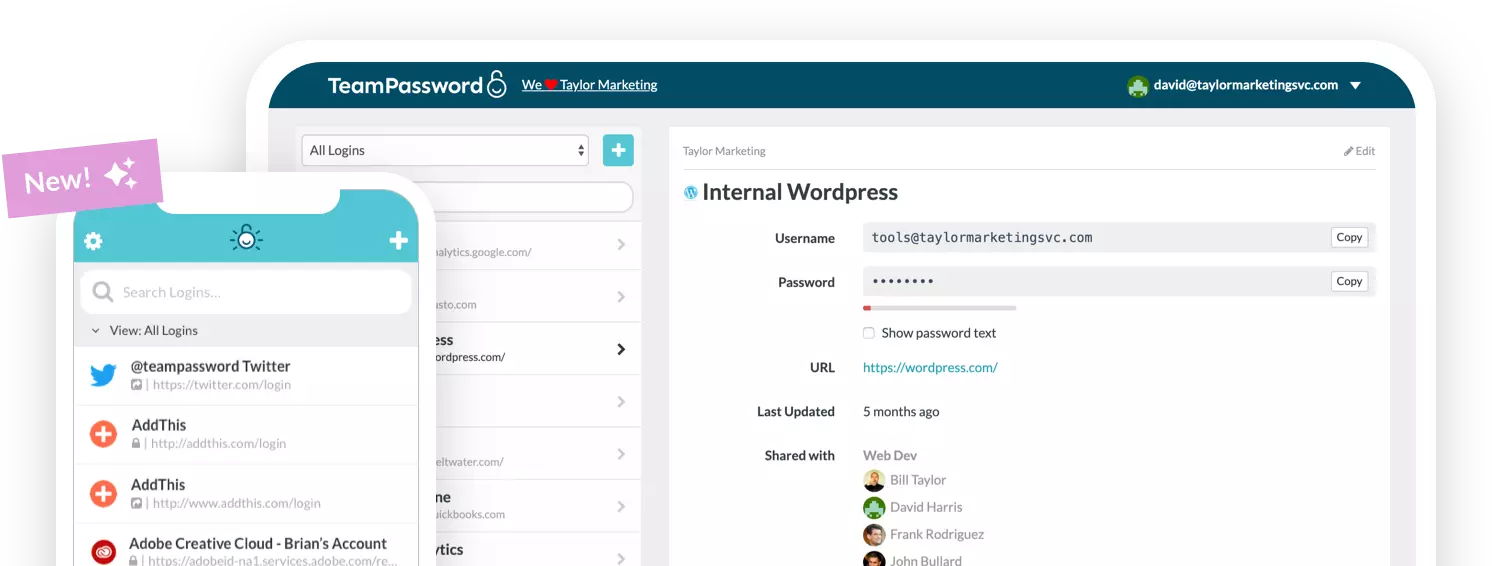
TeamPassword Enterprise includes One-time Secret links. You create the link from a record, choose whether it expires after 24 hours, 3 days or 7 days, and send it to the person outside your team. The link opens once: after the first view it stops working, so it does not linger in an inbox as a working password. If the record has a TOTP secret, the recipient also sees the live 2FA code until the link expires. Learn more on the One-time Secret page.
What you give up: this is not on the $2.41 Standard plan, so a team that only needs links pays the Enterprise rate. Keeper and 1Password include expiring links on lower tiers. TeamPassword's case is the whole package: unlimited shared groups, a built-in TOTP authenticator, an activity log and a short learning curve, at $5.25 per user against $8.99 for 1Password Business.
TeamPassword One-Time Secret Links at a Glance
- One-time Secret links that open once and expire after 24 hours, 3 days or 7 days (Enterprise)
- Enterprise is $5.25 per user per month billed annually ($6.30 monthly), 3-user minimum
- Unlimited shared groups for everyone inside the team
- Activity log with filters and CSV export
Compare plans on the pricing page.
2. Keeper
Best for: the most flexible expiry at a low price, from $2.00 per user per month on Business Starter.
Keeper One-Time Share lets you send a record to someone with no Keeper account. Presets run from 1 hour to 90 days, with custom expiry up to 180 days, and the link only works on one device. A bidirectional option lets the recipient edit the record or upload files back. Admins can block these links.
It is on Business Starter, Business and Enterprise. Business Starter is limited to 5 to 10 users.
Keeper One-Time Share at a Glance
- Expiry from 1 hour up to 180 days
- Link locks to one device
- Bidirectional option for two-way exchange
3. 1Password
Best for: tight admin control over external links, at $8.99 per user per month on Business.
1Password item sharing links work for recipients without an account. Admins set the maximum lifespan (1 hour, 1 day, 7 days, 14 days or 30 days), can make links expire after one view, can restrict recipients to anyone, verified emails or approved domains, and can block file sharing.
Links are on the Teams Starter Pack ($24.95 per month for up to 10 people) as well as Business, which makes 1Password good value for a team of about 10.
1Password Sharing Links at a Glance
- Admin-set maximum lifespan up to 30 days
- Optional view-once expiry
- Recipient restrictions by email or domain
- Included on the Teams Starter Pack
4. Bitwarden
Best for: sending files as well as text, at $4.00 per user per month on Teams.
Bitwarden Send shares text or files through a link. You set a deletion date up to 31 days (default 7), an optional expiration date, a maximum access count and an optional password. Text Send works on the free plan; Teams and Enterprise add files.
The admin policy to restrict Send is Enterprise only.
Bitwarden Send at a Glance
- Text and files on Teams
- Deletion date up to 31 days
- Max access count and optional password
5. Proton Pass
Best for: the cheapest plan with expiring links, at $1.99 per user per month on Essentials.
Proton Pass for Business includes secure link sharing on all business plans, and recipients need no Proton account. Links default to 7 days, last up to 30, and can carry a view limit. Professional ($4.99) adds a policy to turn off outside sharing. Both plans have a 3-user minimum.
Proton Pass Secure Links at a Glance
- Expiry up to 30 days
- Optional view limit
- On all business plans, from $1.99
- Outside-sharing policy on Professional
6. NordPass
Best for: teams that want a precise view count. Business is from $3.59 per user per month on a 2-year plan.
NordPass share-via-link offers expiry of 1 hour, 1 day, 7, 14 or 30 days, up to 100 views or unlimited, sent to anyone or to specific verified emails. Granular sharing policies govern it on Teams, Business and Enterprise.
Links can only be created in the desktop apps (Windows, macOS, Linux), for single items. Annual prices are promo-driven; Business is $5.99 billed monthly.
NordPass Share via Link at a Glance
- Expiry from 1 hour to 30 days
- Up to 100 views, or unlimited
- Desktop apps only
7. Zoho Vault
Best for: very short-lived shares at the lowest price, at $0.90 per user per month on Standard.
Zoho Vault one-time sharing with third parties starts on Standard. Validity runs from 30 minutes to 24 hours, the share is view-only, and the recipient needs a decryption key that you send separately. That adds a step for the recipient. Zoho's help page also mentions links being available for up to 72 hours, so test it before relying on it.
Zoho Vault One-Time Sharing at a Glance
- Validity from 30 minutes to 24 hours
- Separate decryption key required
- View-only for the recipient
8. Dashlane
Best for: occasional login handoffs if you are already on Dashlane, at $8.00 per user per month on Omnix Password Management.
Dashlane link sharing sends a login to someone who does not use Dashlane. It is on all plans, but on business plans an admin must turn it on. The link expires after one view or 24 hours. You cannot change the expiry or revoke access after sending, and it works for logins only, from the web app.
Dashlane Link Sharing at a Glance
- Fixed: one view or 24 hours
- Logins only, from the web app
- Admin must enable it on business plans
- No revoke after sending
How to Choose
- Small or mid-size team that wants easy group sharing and one-time links in one tool: TeamPassword Enterprise at $5.25.
- Long or flexible expiry: Keeper, from $2.00.
- Admin control over link lifespan and recipients: 1Password.
- Sending files: Bitwarden Send on Teams.
- Lowest price with expiring links: Zoho Vault Standard at $0.90, or Proton Pass Essentials at $1.99.
Frequently Asked Questions
Which password manager has the best one-time secret links in 2027?
For small and mid-size teams that want simple team sharing plus one-time links, TeamPassword Enterprise at $5.25 per user per month is our pick. On the link feature alone, Keeper has the most flexible expiry, up to 180 days, from Business Starter at $2.00, and 1Password offers 1 hour to 30 days with an optional view-once setting.
What is a one-time secret link?
It is a link that lets someone outside your password manager open a password or note without an account, and then stops working after it is viewed or after a set time. It replaces pasting a password into email or chat, where it stays readable forever.
Which plan do I need for one-time secret links?
It depends on the vendor. TeamPassword includes One-time Secret links on Enterprise only, at $5.25 per user per month. Keeper includes One-Time Share on all business tiers, 1Password on the Teams Starter Pack and Business, Proton Pass and NordPass on all business plans, and Zoho Vault from Standard.
Can LastPass send an expiring password link?
We found no expiring or one-time link in LastPass's documentation. LastPass can share an item by email with someone who does not use LastPass, but no expiry option is described. If you need links that expire, the other tools in this list are a better fit.
Should I use a one-time link or add someone to a group?
Use a one-time link when someone outside your team needs a secret once, such as a contractor or a client's developer. Add them to a group when they will need the login again, or when the password will change, because a group keeps them current and you can remove them later.
Are one-time secret links safe?
They are much safer than email or chat because the secret does not sit in an inbox indefinitely. They are not magic: once the recipient views the password, they can copy it. Keep expiry short, send the link through one channel and any extra key through another, and change the password after the work is done.
Try TeamPassword
If your team shares logins every day and occasionally needs to hand one to an outsider, TeamPassword covers both.
- One-time Secret links that open once and expire after 24 hours, 3 days or 7 days (Enterprise)
- Unlimited shared groups with no record caps
- Built-in TOTP authenticator: store the 2FA secret on a shared record so the whole group sees the live code
- Require 2FA for the whole team
- Activity log of record views, edits, deletions, attachments, invitations, logins and security-setting changes, with filters and CSV export
- Standard $2.41 per user per month billed annually ($2.88 monthly); Enterprise $5.25 ($6.30 monthly); 3-user minimum
Try TeamPassword free for 14 days
More in This Series
- Best Password Managers with a Built-in Authenticator
- Best Password Managers with Access Control
- Best Password Managers with Activity Logs
- Best Password Managers for Sharing Passkeys
- Best Password Managers with Admin Security Controls
- Best Password Managers with Autofill for Teams
- Best Password Managers with a Passphrase Generator
- Best Password Managers with Group-Based Sharing
- Cheapest Business Password Managers
- Best Password Managers for Teams