For small and mid-size teams, TeamPassword is the best password manager with a built-in authenticator: the TOTP generator is on the $2.41 Standard plan, and the live code shows on the shared record for everyone in the group. If you want the code filled in at sign-in and can pay $8.99 per user, 1Password Business is the pick. Zoho Vault shares TOTP codes from $0.90 on Standard if price is everything, and LastPass ranks last because vault TOTP needs Teams or Business and its Authenticator is a separate app.
Key Takeaways
- TeamPassword is a SOC 2-certified team password manager so simple that non-technical teammates adopt it, with group-based sharing since 2012. Its built-in TOTP authenticator is on Standard: store the 2FA secret on a shared record so the whole group sees the live code.
- 1Password, Dashlane, NordPass, Keeper and Zoho Vault also document sharing TOTP codes with teammates. Prices range from $0.90 (Zoho Standard) to $8.99 (1Password Business) per user per month.
- Plan gates matter: LastPass vault TOTP is Teams and Business only, Bitwarden needs a paid plan to generate codes, and Zoho needs Standard to share them.
- Several vendors still push a separate authenticator app (LastPass Authenticator, Bitwarden Authenticator, Proton Authenticator).
Built-in Authenticators Compared (November 2026)
| Product | Supports built-in TOTP? | Shares live codes with teammates? | Plan required | Team price (per user/month, annual) | Notes/caveats |
|---|---|---|---|---|---|
| TeamPassword | Yes | Yes, through groups | Standard and Enterprise | $2.41 Standard, $5.25 Enterprise | 3-user minimum. Sharing is group-based. Sign-in 2FA for your TeamPassword account uses an authenticator app with backup codes. Hardware keys are not supported |
| 1Password | Yes | Yes, via shared vaults | No plan restriction stated | $8.99 Business; Teams Starter Pack $24.95/mo for up to 10 | Fills the code during sign-in |
| Dashlane | Yes | Yes, sharing a login shares its 2FA token | "For all plans" | $8.00 Omnix Password Management | Some sites require their own authenticator app |
| NordPass | Yes | Yes, on shared Password items | All business tiers | $3.99 Business (5-user minimum); Teams $1.99 as a 10-user pack | Extension support: Chromium browsers on macOS and Windows, Firefox on Windows; no Safari listed |
| Keeper | Yes | Yes, via shared records | Not stated in docs | $4.00 Business; Business Starter $2.00 for 5 to 10 users | Plan tier for TOTP not stated in docs |
| Zoho Vault | Yes | Yes | Standard and above (not Free) | $0.90 Standard, $4.50 Professional | Admins can restrict TOTP per user or group |
| Bitwarden | Yes | Not stated for collection-shared items | Premium or a paid organization to generate codes | $4.00 Teams | Storing keys works on Free; Bitwarden Authenticator is a separate app |
| LastPass | Yes, as a vault field | Yes | Teams and Business only | $4.25 Teams (50-user cap), $7.00 Business | LastPass Authenticator is a separate mobile app |
How We Evaluated These, and Our Disclosure
Disclosure: TeamPassword publishes this article, and TeamPassword ranks first. Every competitor fact below comes from that vendor's own pages, and where TeamPassword lacks something, we say so.
We ranked on five criteria, in this order:
- Shared live codes. Can a teammate see the current code without asking anyone?
- Plan gating. Is it on the plan a small team would buy?
- Price for a real team, including seat minimums and fixed packs.
- One place for the login and the code, with no separate app.
- Simplicity for non-technical teammates.
Facts verified November 2026 from each vendor's own pricing and help pages. Proton Pass for Business and RoboForm both generate TOTP codes, but neither documents sharing the live code with teammates, so we left them out of the ranking.
Why a Built-in Authenticator Matters for Teams
Picture a five-person agency. The Google Ads account, the domain registrar, the company Instagram and the AWS root account all have two-factor authentication turned on, which is correct. The problem is where the codes go: one founder's phone. When she is on a plane, nobody can pause a runaway ad campaign or renew a domain that expires at midnight.
A TOTP code is generated from a secret key plus the current time. Whoever holds the key can generate the code. Put the key on the shared record and the code follows the account, not the person.
Offboarding is the other half. If the only copy of a 2FA secret sits in a departing employee's authenticator app, you need their help to lock them out. If it lives on a shared record, removing them from the group removes their access to the code.
The Best Password Managers with a Built-in Authenticator, Ranked
1. TeamPassword
Best for: small and mid-size teams that share 2FA-protected accounts, at $2.41 per user per month on Standard (billed annually, 3-user minimum).
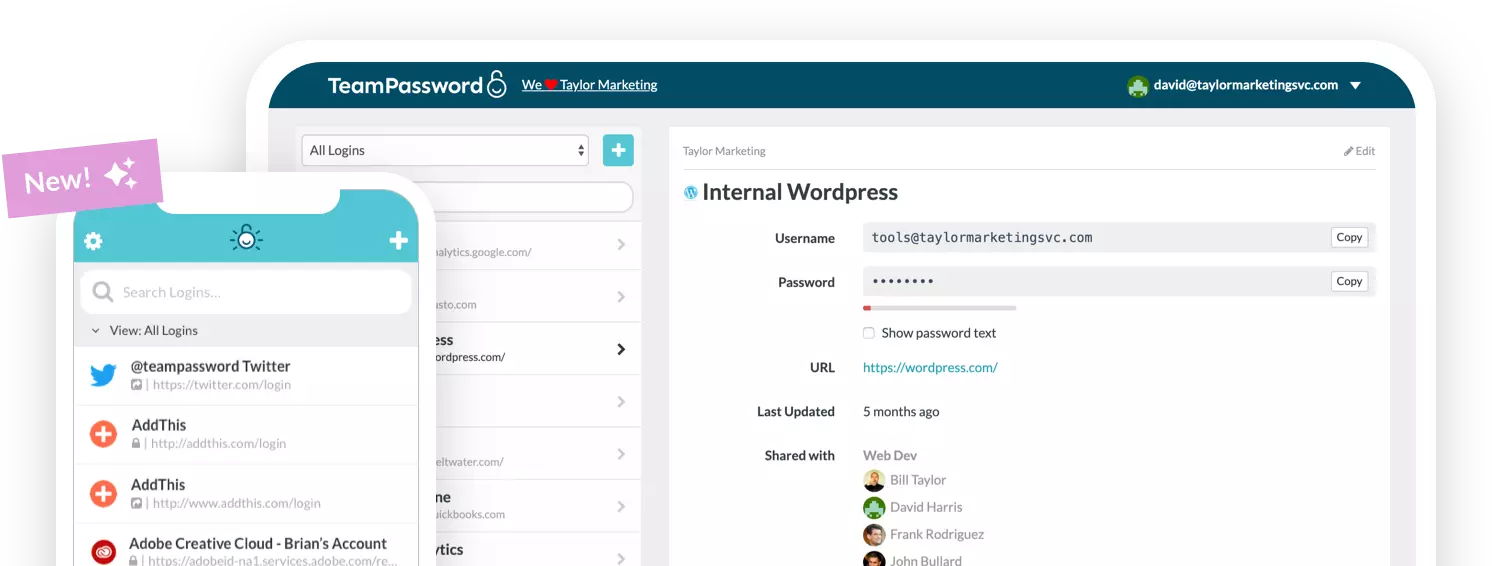
TeamPassword has a built-in TOTP authenticator on Standard and Enterprise. You paste the account's setup key into the Auth Secret (TOTP) field on a record, and TeamPassword shows the current six-digit code next to the login, refreshing every 30 seconds. Share that record with a group and everyone in the group sees the same live code. Nobody texts the founder for a code. Our step-by-step TOTP setup guide walks through it with screenshots.
What you give up: sharing is group-based, so to share one record with one person you put it in a group. Signing in to TeamPassword itself is protected by two-factor authentication with backup codes through an authenticator app, and admins can require 2FA for the whole team. Hardware security keys such as YubiKey are not supported for that sign-in, and there is no breach or password health report. If your security policy requires security-key login, choose a vendor that documents it and confirm on their own pages. See TeamPassword pricing.
TeamPassword Built-in Authenticator at a Glance
- Built-in TOTP authenticator: store the 2FA secret on a shared record so the whole group sees the live code
- Included on Standard ($2.41) and Enterprise ($5.25), per user per month billed annually
- Unlimited shared groups with no record caps
- Require 2FA for the whole team; activity log with filters and CSV export
2. 1Password
Best for: teams that want the code filled in at sign-in and have the budget, at $8.99 per user per month for Business.
1Password stores one-time passwords on login items, added by scanning a QR code or pasting a setup key, and fills the code during sign-in. Move those logins into a shared vault and teammates get the code too. No plan restriction is stated.
What you give up is mostly money: $8.99 per user is more than three times TeamPassword Standard.
1Password Built-in Authenticator at a Glance
- Shared through shared vaults
- Fills the code during sign-in
- $8.99 Business; Teams Starter Pack $24.95/mo for up to 10
3. Dashlane
Best for: teams already on Dashlane's credential-security platform, at $8.00 per user per month for Omnix Password Management.
Dashlane stores 2FA tokens for sites in your vault, and its help center tags the feature "For all plans." When you share a login with another Dashlane user, you also share that login's 2FA token. Dashlane warns that some sites require their own authenticator app.
What you give up: price. At $8.00 per user, Dashlane costs more than three times TeamPassword.
Dashlane Built-in Authenticator at a Glance
- 2FA tokens stored in the vault on all plans
- Sharing a login shares its 2FA token
- $8.00 Omnix Password Management
4. NordPass
Best for: teams of 10 or more on Chromium browsers, at $3.99 per user per month for Business (1-year plan, 5-user minimum).
NordPass calls its built-in TOTP generator NordPass Authenticator, and it is on all business tiers. Two-factor codes can be added to shared Password items, so teammates see them.
What you give up: browser coverage. In the extension, NordPass Authenticator works in Chromium browsers on macOS and Windows and Firefox on Windows, plus the iOS and Android apps, with no Safari listed. The cheaper Teams plan ($1.99) is sold only as a 10-user pack, and Business needs five users.
NordPass Built-in Authenticator at a Glance
- NordPass Authenticator on Teams, Business and Enterprise
- Extension: Chromium on macOS and Windows, Firefox on Windows; no Safari listed
- $3.99 Business (5-user minimum); Teams $1.99 per user as a 10-user pack
5. Keeper
Best for: compliance-focused teams already evaluating Keeper, at $4.00 per user per month for Business.
Keeper stores two-factor codes on records, and its enterprise documentation presents shared records as the fix for codes that live on one person's device. Codes can be filled at login.
What you give up: clarity. Keeper's docs do not state which plan tier includes the feature, so confirm that with Keeper before you buy. Business Starter is $2.00 per user for 5 to 10 users.
Keeper Built-in Authenticator at a Glance
- Two-factor codes stored on records
- Shared records documented as the answer to one-device codes
- $4.00 Business; Business Starter $2.00 for 5 to 10 users
6. Zoho Vault
Best for: price-first teams, at $0.90 per user per month on Standard.
Zoho Vault has supported TOTP since December 2021, and "Share passwords with TOTP codes" is listed from Standard up, not on Free. A June 2026 release lets admins restrict TOTP access per user or group.
What you give up: user groups and folder sharing are on Professional ($4.50) and Enterprise, both with a five-user minimum.
Zoho Vault Built-in Authenticator at a Glance
- TOTP sharing from Standard ($0.90), not on Free
- Admins can restrict TOTP per user or group
- User groups need Professional ($4.50, 5-user minimum)
7. Bitwarden
Best for: open-source teams, at $4.00 per user per month for Teams.
Bitwarden can store TOTP keys on any account, but generating codes needs Premium or a paid organization (Families, Teams or Enterprise). All paid-organization members get TOTP.
What you give up: Bitwarden's help center does not state whether the live code shows on items shared through collections, so the shared-code scenario is unconfirmed. Bitwarden Authenticator is a separate app that can sync codes into the password manager.
Bitwarden Built-in Authenticator at a Glance
- Storing keys is free; generating codes needs a paid plan
- Integrated authenticator on Teams ($4.00) and Enterprise ($6.00)
- Live codes on collection-shared items not documented
8. LastPass
Best for: organizations already standardized on LastPass Business, at $4.25 per user per month for Teams.
LastPass stores TOTP as a field on vault password items, and the code can be shared with others who use the same credentials. It can also fill the code if conditions are met.
What you give up: the vault feature is "only available for LastPass Teams and LastPass Business accounts," and LastPass Authenticator is a separate mobile app. Teams is capped at 50 users; Business is $7.00 and Business Max $11.00.
LastPass Built-in Authenticator at a Glance
- Teams and Business only
- Separate LastPass Authenticator app
- $4.25 Teams (50-user cap), $7.00 Business, $11.00 Business Max
How to Choose
- A small or mid-size team where 2FA codes go to one person's phone: TeamPassword. Standard at $2.41 shows the live code to the whole group.
- You want the code filled in at sign-in and price is secondary: 1Password Business at $8.99.
- The lowest possible price: Zoho Vault Standard at $0.90, if you can live without user groups.
- Open source is a requirement: Bitwarden Teams at $4.00, after confirming how codes appear on shared items.
- You need hardware security keys for vault sign-in: not TeamPassword; choose a vendor that documents it. For standalone apps, see our guide to the best authenticator apps.
Frequently Asked Questions
Which password manager has the best built-in authenticator in 2027?
For small and mid-size teams, TeamPassword: its built-in TOTP authenticator is on the $2.41 Standard plan, and the live code appears on the shared record for everyone in the group. If you need the code filled in for you at sign-in and can pay $8.99 per user, 1Password Business is the strongest alternative.
Can a team share 2FA codes in a password manager?
Yes. You store the account's TOTP setup key on a shared login record, and every teammate with access to that record sees the same rotating six-digit code. TeamPassword, 1Password, Dashlane, NordPass, Keeper, Zoho Vault and LastPass all document this. Bitwarden does not state in its help center whether the live code shows on items shared through collections.
Is it safe to keep 2FA codes in the same password manager as the passwords?
It is a trade-off. Anyone who gets into the vault gets both factors for those accounts, so protect the password manager itself with a strong master password and its own two-factor sign-in. For shared business accounts, that risk is usually smaller than the alternative: one person's phone holding the only copy of the code.
Do I need a paid plan to use a password manager's built-in authenticator?
Often, yes. LastPass limits vault TOTP to Teams and Business, Bitwarden needs Premium or a paid organization to generate codes, and Zoho Vault puts TOTP sharing on Standard ($0.90) and above. TeamPassword includes it on Standard at $2.41 per user per month billed annually, with a 3-user minimum and a 14-day free trial.
Does TeamPassword support hardware security keys for signing in?
No. Signing in to TeamPassword is protected by two-factor authentication through an authenticator app, with backup codes, and admins can require 2FA for the whole team. Security keys such as YubiKey are not supported for TeamPassword sign-in. If that is a requirement, choose a vendor that documents security-key sign-in.
What happens to shared 2FA codes when an employee leaves?
In a password manager, you remove the person from the group or vault and they stop seeing the record and its live code. If they could see the setup key itself, assume they may have kept a copy and reset 2FA on that account. With a code on someone's personal phone, you have neither option until they hand the account back.
Try TeamPassword
If your team's 2FA codes all land on one phone, TeamPassword fixes that in an afternoon.
- Built-in TOTP authenticator: store the 2FA secret on a shared record so the whole group sees the live code
- Unlimited shared groups with no record caps
- Two-factor authentication with backup codes, and you can require 2FA for the whole team
- 14-day free trial
- Standard $2.41 per user per month billed annually ($2.88 monthly); Enterprise $5.25 ($6.30 monthly); 3-user minimum
Try TeamPassword free for 14 days
More in This Series
- Best Password Managers with Access Control
- Best Password Managers with Activity Logs
- Best Password Managers for Sharing Passkeys
- Best Password Managers with Admin Security Controls
- Best Password Managers with Autofill for Teams
- Best Password Managers with a Passphrase Generator
- Best Password Managers with One-Time Secret Links
- Best Password Managers with Group-Based Sharing
- Cheapest Business Password Managers
- Best Password Managers for Teams