TeamPassword is the best pick for small and mid-size teams that share logins and work in Chrome: one-click autofill in login fields for shared group logins, from $2.41 per user per month. Its autofill is Chrome-only, though. If your team relies on Safari, Firefox or phone autofill, 1Password ($8.99) or Bitwarden ($4.00) is the stronger choice, and Proton Pass ($1.99, 3-user minimum) is the cheapest option with autofill across five browsers and both mobile platforms.
Key Takeaways
- TeamPassword is a SOC 2-certified team password manager so simple that non-technical teammates adopt it, with group-based sharing since 2012. It offers one-click autofill in login fields and prompts to save new and changed passwords, in the Chrome extension only.
- 1Password has the broadest documented coverage: Chrome, Firefox, Edge, Brave and Safari, plus iOS and Android, on all plans.
- Bitwarden autofills in nine browsers and on Android and iOS for $4.00 per user per month on Teams, with no plan restriction stated for autofill.
- Proton Pass for Business is the lowest price with autofill on all its business tiers, at $1.99 per user per month and a 3-user minimum.
- Autofill matters most for shared logins: it lets a teammate sign in to a client or vendor account without anyone revealing, retyping or pasting the password into a chat.
Autofill for Teams Compared (November 2026)
| Product | Supports autofill? | Browsers covered | Mobile autofill | Plan required | Team price (per user/month, annual) | Notes/caveats |
|---|---|---|---|---|---|---|
| TeamPassword | Yes, one-click in login fields | Chrome only | No | Standard and Enterprise | $2.41 Standard, $5.25 Enterprise | Firefox, Safari and Edge extensions exist without one-click autofill. 3-user minimum |
| 1Password | Yes | Chrome, Firefox, Edge, Brave, Safari | iOS and Android | All plans | $8.99 Business | Teams Starter Pack $24.95/mo for up to 10 members |
| Bitwarden | Yes | Chrome, Edge, Safari, Firefox, Opera, DuckDuckGo, Vivaldi, Brave, Tor | Android and iOS | No restriction stated | $4.00 Teams | Android: custom fields and split login flows not supported |
| Proton Pass for Business | Yes | Chrome, Firefox, Edge, Brave, Safari | Android and iOS apps | All business tiers | $1.99 Essentials | 3-user minimum, 3 to 30 users on Essentials |
| Keeper | Yes | Chrome, Firefox, Safari, Edge, Opera | Android and iOS | All business tiers | $4.00 Business | Business Starter $2.00 for 5 to 10 users; Enterprise by quote |
| NordPass | Yes | Chrome/Chromium, Firefox, Opera, Edge, Safari | Android 9+, iOS 18+ | Teams, Business, Enterprise | $3.99 Business | 5-user minimum on Business; Teams sold as a 10-user pack |
| Zoho Vault | Yes | Ulaa, Chrome, Firefox, Safari, Edge, Vivaldi, Brave, Opera | Mobile apps on all plans | All plans, including Free | $4.50 Professional | 5-user minimum on Professional |
| Dashlane | Yes | Chrome, Firefox, Edge, Safari, other Chromium | Android and Apple apps | Omnix Password Management | $8.00 | Safari needs macOS Sequoia 15+ |
How We Evaluated These, and Our Disclosure
Disclosure: this article is published by TeamPassword, and TeamPassword ranks first below. Autofill is our weakest area against this field, so read our rank as "best for small teams sharing logins in Chrome", not "widest autofill".
Criteria, in priority order:
- Autofill on shared logins, not just personal ones, since the team case is the reason to buy a business plan.
- Browser and mobile coverage, read from each vendor's own system requirements.
- Plan required, because some vendors gate autofill to a paid business tier.
- Real price for a small team, including seat minimums and fixed packs.
- Adoption, because autofill nobody turns on protects nobody.
Facts verified November 2026 from each vendor's own pricing and help pages.
Why Autofill Matters for Teams
For a solo user, autofill is convenience. For a team it is a security control. Picture an agency with 40 client logins. Without autofill, an account manager reveals each password, copies it and pastes it into a login page. Every reveal can land on a screen share, and every copy can end up in a Slack thread "just this once".
With autofill on a shared record, the teammate clicks once and the fields fill. Nobody reads the password, which matters when a contractor needs the shared Google Ads account for two weeks, or when someone leaves and you wonder who actually knows the payroll portal password.
Save prompts are the other half: when someone changes a shared password and the manager offers to save it, the shared record stays current instead of drifting while people keep their own copies.
The Best Password Managers with Autofill, Ranked
1. TeamPassword
Best for: small teams that share logins and work in Chrome, at $2.41 per user per month billed annually (3-user minimum).
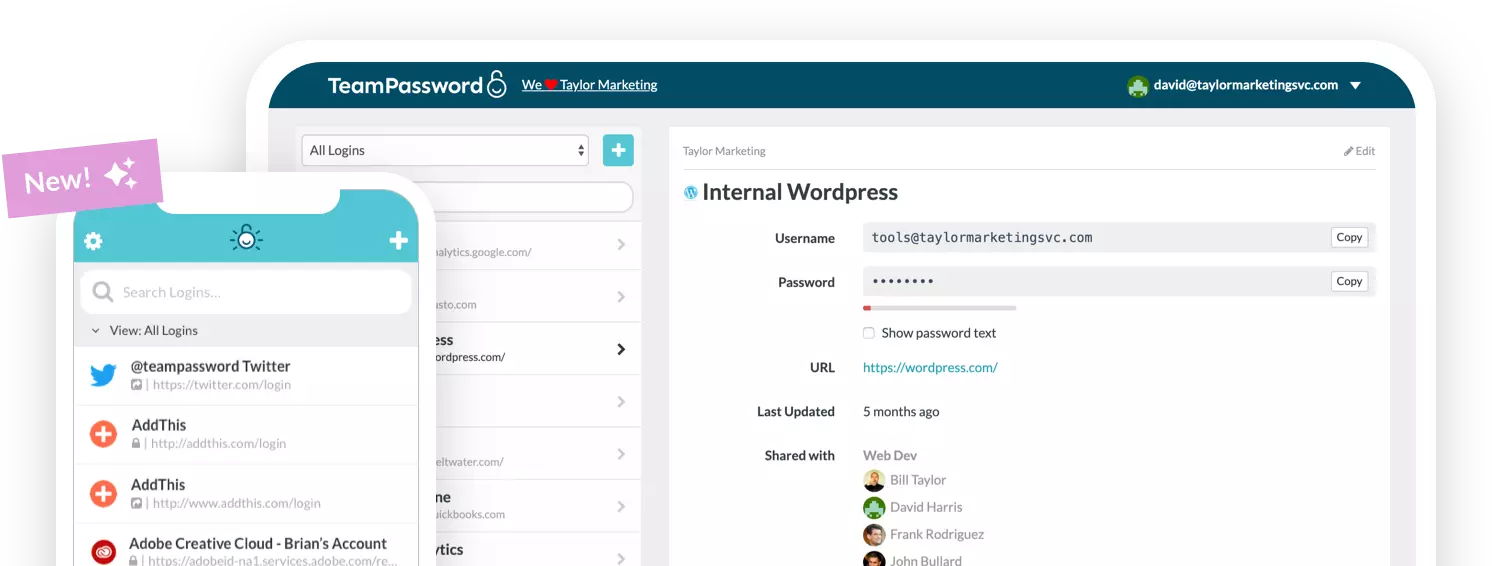
TeamPassword offers one-click autofill in login fields through its Chrome extension, plus prompts to save new and changed passwords. The value is on shared records: put a client's login in a group, and everyone in that group can fill it with one click without the password being revealed or retyped. On Enterprise ($5.25), the view-only role goes further: members can copy and use a password without it ever being shown on screen, and cannot edit or delete records. It does not stop someone pasting a copied password elsewhere, so treat it as a guard against shoulder-surfing and accidental edits, not as copy protection.
What you give up is real. One-click autofill is Chrome only. TeamPassword's Firefox, Safari and Edge extensions exist, but they do not have one-click autofill, and we do not offer mobile autofill. TeamPassword fills the fields; it does not submit the form for you. If your team lives in Safari on Macs or signs in to shared accounts from phones, 1Password or Bitwarden will serve you better. See all features and pricing, and our guide on how to safely share passwords with coworkers.
TeamPassword Autofill at a Glance
- One-click autofill in login fields (Chrome extension)
- Prompts to save new and changed passwords (Chrome extension)
- Works on group-shared records, so teammates sign in without seeing or retyping the password
- Browser extensions for Chrome, Firefox, Safari and Edge, but one-click autofill only in Chrome
- Standard $2.41 per user per month billed annually ($2.88 monthly); Enterprise $5.25 ($6.30 monthly)
2. 1Password
Best for: teams on mixed browsers and phones that want the broadest autofill coverage, at $8.99 per user per month on Business.
1Password documents autofill in Chrome 140+, Firefox 140+, Edge 140+, Brave 1.82+ and Safari 18.6+ on macOS 13 or later, plus iOS and Android, on all plans. You can move logins, including their one-time passwords, into shared vaults, and 1Password fills one-time passwords automatically during sign-in when the 2FA secret is stored on the item. For a team that switches between a Mac at the office and an Android phone on the road, that coverage is the main reason to pay more.
The trade-off is price: Business is $8.99 per user per month, more than three times TeamPassword. The Teams Starter Pack ($24.95 per month for up to 10 members) is good value at exactly that size.
1Password Autofill at a Glance
- Five desktop browsers including Safari, plus iOS and Android
- Autofill on all plans
- Fills stored one-time passwords during sign-in
- Business $8.99; Teams Starter Pack $24.95/mo for up to 10 members
3. Bitwarden
Best for: the widest browser list at a mid-range price, at $4.00 per user per month on Teams.
Bitwarden lists browser extensions for Chrome, Edge, Safari, Firefox, Opera, DuckDuckGo, Vivaldi, Brave and Tor. On Android it works as an autofill service, with inline suggestions on Android 11+ and a popup on Android 8+, and there is an iOS app. Bitwarden's help center states no plan restriction for autofill, and Teams adds organization sharing for logins the whole team uses.
The documented gap is on Android, where custom fields and split login flows (username on one screen, password on the next) are not supported.
Bitwarden Autofill at a Glance
- Nine desktop browsers, including Safari, Firefox and Tor
- Android autofill service and iOS app
- No plan restriction stated for autofill
- Teams $4.00, Enterprise $6.00
4. Proton Pass for Business
Best for: the lowest price with full browser and mobile autofill, at $1.99 per user per month on Essentials.
Proton Pass lists "Autosave and autofill" on all business tiers, with extensions for Chrome, Firefox, Edge, Brave and Safari and apps for Android and iOS. At $1.99 it undercuts TeamPassword and covers more browsers.
Watch the plan limits. Essentials needs at least 3 users and tops out at 30, and group sharing is a Professional feature at $4.99. If you want group-shared logins to autofill, price it on Professional.
Proton Pass Autofill at a Glance
- Chrome, Firefox, Edge, Brave and Safari extensions
- Android and iOS apps
- Autosave and autofill on all business tiers
- Essentials $1.99 (3 to 30 users); Professional $4.99
5. Keeper
Best for: compliance-focused teams that want autofill everywhere, at $4.00 per user per month on Business.
Keeper says its extension works in "every web browser including Chrome, Firefox, Safari, Edge, Opera", and it acts as the autofill service on Android and iOS. "Autofill across all devices" is listed on all three business tiers.
Business is $4.00 per user per month billed annually, with no monthly option. Business Starter is $2.00 but limited to 5 to 10 users, and Enterprise is quote-only.
Keeper Autofill at a Glance
- Chrome, Firefox, Safari, Edge and Opera
- Android and iOS autofill
- Included on Business Starter, Business and Enterprise
- Business $4.00; Business Starter $2.00 (5 to 10 users)
6. NordPass
Best for: teams of 10 or more on a budget, at $3.99 per user per month on Business (1-year plan).
NordPass supports the two latest major versions of Chrome and other Chromium browsers, Firefox, Opera, Edge and Safari, plus Android 9+ and iOS 18+. "Autosave and autofill" is included on Teams, Business and Enterprise.
The catch is packaging: Teams ($1.99) is sold only as a 10-user pack, so a six-person team pays for four empty seats, and Business needs at least 5 users.
NordPass Autofill at a Glance
- Five browser families including Safari
- Android 9+ and iOS 18+
- Autosave and autofill on all business tiers
- Business $3.99 (1-year) or $3.59 (2-year); 5-user minimum
7. Zoho Vault
Best for: teams already on Zoho, or with no budget, at $4.50 per user per month on Professional.
Zoho Vault lists "Save and autofill passwords" on every plan, including Free. Its extension covers Ulaa, Chrome, Firefox, Safari, Edge, Vivaldi, Brave and Opera, the mobile apps are on all plans, and on iOS it can fill TOTP codes from the keyboard.
User groups and folder sharing are on Professional and Enterprise only, both with a 5-user minimum.
Zoho Vault Autofill at a Glance
- Eight browsers, including Safari and Firefox
- Mobile apps on all plans, with TOTP fill from the iOS keyboard
- Autofill on every plan, including Free
- Professional $4.50; Enterprise $7.20
8. Dashlane
Best for: buyers who want autofill bundled into a broader credential-security product, at $8.00 per user per month for Omnix Password Management.
Dashlane supports Chrome, Firefox, Edge, other Chromium browsers and Safari, plus Android and Apple mobile apps. Omnix Password Management lists "AI-Powered Autofill".
Safari support needs macOS Sequoia 15 or later, and at $8.00 it sits near 1Password on price.
Dashlane Autofill at a Glance
- Chrome, Firefox, Edge, Safari (macOS 15+) and other Chromium browsers
- Android and Apple mobile apps
- Omnix Password Management $8.00 per user per month
How to Choose
- Small team, shared client or vendor logins, everyone on Chrome: TeamPassword at $2.41.
- Team on Safari, Firefox or a mix of browsers: Bitwarden at $4.00, or 1Password at $8.99 for the most polished option.
- People sign in to shared accounts from their phones: 1Password or Bitwarden. TeamPassword does not offer mobile autofill.
- Lowest price with autofill everywhere: Proton Pass at $1.99, with a 3-user minimum.
- Zero budget: Zoho Vault's Free plan, which keeps autofill.
Frequently Asked Questions
Which password manager has the best autofill in 2027?
For coverage, 1Password and Bitwarden lead: both autofill in Safari, Firefox, Chrome and Edge and on iOS and Android. For small teams that share logins and work in Chrome, TeamPassword is the simpler and cheaper pick at $2.41 per user per month. Proton Pass is the lowest price with full browser and mobile autofill at $1.99.
Does TeamPassword autofill passwords?
Yes, in the Chrome extension. TeamPassword offers one-click autofill in login fields and prompts to save new and changed passwords there. The Firefox, Safari and Edge extensions do not have one-click autofill, and TeamPassword does not offer mobile autofill.
Does password manager autofill log you in automatically?
Not necessarily. Most password managers fill the username and password fields, and you still press the sign-in button. TeamPassword fills login fields with one click; it does not submit the form for you.
Can teammates autofill a shared password without seeing it?
Yes. With autofill on a shared record, a teammate clicks once and the login fields fill, so nobody has to reveal or retype the password. TeamPassword's Enterprise view-only role also hides the password on screen, though members can still copy it, so it is not copy protection.
How much does a team password manager with autofill cost?
Proton Pass Essentials is $1.99 per user per month with a 3-user minimum, TeamPassword Standard is $2.41, Bitwarden Teams is $4.00 and 1Password Business is $8.99, all billed annually. Zoho Vault includes autofill on its Free plan. Watch seat minimums: NordPass Business needs 5 users and Zoho Vault Professional needs 5.
Is browser autofill safe for shared business accounts?
It is safer than copying and pasting. Autofill is tied to the site address a login was saved for, so a lookalike phishing page is less likely to get the password than a person pasting it by hand. Pair it with enforced 2FA and group-based access.
Try TeamPassword
If your team shares logins and works in Chrome, TeamPassword gives you autofill on those shared logins without the price of a security platform.
- One-click autofill in login fields (Chrome extension)
- Prompts to save new and changed passwords (Chrome extension)
- Unlimited shared groups with no record caps
- Built-in TOTP authenticator: store the 2FA secret on a shared record so the whole group sees the live code
- Require 2FA for the whole team
- Standard $2.41 per user per month billed annually ($2.88 monthly); Enterprise $5.25 ($6.30 monthly); 3-user minimum
Try TeamPassword free for 14 days
More in This Series
- Best Password Managers with a Built-in Authenticator
- Best Password Managers with Access Control
- Best Password Managers with Activity Logs
- Best Password Managers for Sharing Passkeys
- Best Password Managers with Admin Security Controls
- Best Password Managers with a Passphrase Generator
- Best Password Managers with One-Time Secret Links
- Best Password Managers with Group-Based Sharing
- Cheapest Business Password Managers
- Best Password Managers for Teams