TeamPassword is the best password manager with access control for small and mid-size teams: unlimited groups, owner, admin and member roles, and a switch to turn off team-wide sharing, all on the $2.41 per user per month Standard plan, with a view-only role on Enterprise at $5.25. If you need custom roles, Bitwarden is the pick, at $4.00 for Teams with custom roles reserved for Enterprise at $6.00. If you want to separate viewing an item from copying its password, 1Password Business at $8.99 splits those permissions.
Key Takeaways
- TeamPassword is a SOC 2-certified team password manager so simple that non-technical teammates adopt it, with group-based sharing since 2012. Access control is built from unlimited groups plus owner, admin and member roles on Standard, with a view-only role on Enterprise.
- No password manager can stop someone who is allowed to use a password from copying it. Bitwarden, Keeper, Dashlane and Zoho all say on their own pages that hidden passwords are cosmetic or can be bypassed.
- The controls that actually limit exposure are least-privilege groups, fast revocation and an activity log that shows who touched what.
- Several vendors gate the useful parts: 1Password's view-without-copy split is Business only, LastPass Teams and NordPass Teams have no groups, and Bitwarden custom roles need Enterprise.
- Bitwarden and Keeper are genuinely stronger if you need custom or delegated roles.
Access Control Compared (November 2026)
| Product | Supports access control? | Built-in roles | Use a password without revealing it | Plan required | Team price (per user/month, annual) | Notes/caveats |
|---|---|---|---|---|---|---|
| TeamPassword | Yes | Owner, admin, member; view-only on Enterprise | Yes, view-only role | Standard for roles and groups; Enterprise for view-only | $2.41 Standard, $5.25 Enterprise | Group-based only: one record cannot go to one person without a group. Fixed roles. Copying still possible |
| Bitwarden | Yes | Owner, Admin, User; Custom on Enterprise | Yes, "hidden passwords" collection permissions | Teams; custom roles Enterprise only | $4.00 Teams, $6.00 Enterprise | Bitwarden says hidden fields "limit but don't prevent access" |
| 1Password | Yes | Owners, Administrators, Team Members; custom groups | Business only | Business for custom groups and granular vault permissions | $8.99 Business | On Teams, "Allow Viewing" includes copying passwords |
| Keeper | Yes | Admin-created roles at any node | Yes, Privacy Screen | Role-based access control listed under Enterprise; delegated admin Business and up | $2.00 Business Starter (5 to 10 users), $4.00 Business; Enterprise by quote | Keeper says masking "is only visual". Privacy Screen tier not verified |
| NordPass | Yes | Owner, Admin, User | Yes, "Can autofill" (not for passkeys or secure notes) | Groups Business and up; Sharing Hub Enterprise | $1.99 Teams (10-user pack), $3.99 Business, $5.99 Enterprise | Teams is a 10-user pack with no groups |
| Zoho Vault | Yes | Super admin, Admin, User | Yes, "One click login only" | Sharing Standard and up; groups Professional and up | Not verified in USD | 5-user minimum on Professional and Enterprise |
| LastPass | Yes | Admin roles on Business and Business Max | Yes, shared folder "Hide Passwords" | Admin roles and groups: Business | $4.25 Teams, $7.00 Business, $11.00 Business Max | Teams has no groups and is capped at 50 users |
Zoho's pricing page showed only rupees when we checked, so we have not listed a USD price for it.
How We Evaluated These, and Our Disclosure
Disclosure: this article is published by TeamPassword, and TeamPassword is ranked first. Where a competitor does access control better than we do, we say so in its section.
Criteria, in priority order:
- Least privilege by default. Can you give each person exactly the credentials their job needs, and nothing else, without workarounds?
- Which plan you actually need. Many vendors advertise roles on the pricing page and then reserve the useful version for a higher tier.
- Honesty about hidden passwords. We checked what each vendor says its "hide password" option really does.
- Revocation and visibility. How fast you can remove access, and whether there is a log to prove it.
- Adoption. Access rules only work if the team uses the vault instead of a spreadsheet.
Facts verified November 2026 from each vendor's own pricing and help pages.
Why Access Control Matters for Teams
Picture an agency with 15 people and 40 client accounts. The designers need the client's Canva and WordPress logins. The paid media team needs the shared Google Ads account, whose 2FA codes go to one manager's phone. Finance needs the billing portals. If everyone sees everything, a single compromised laptop or one disgruntled contractor exposes every client at once.
Access control shrinks that blast radius. Group credentials by client or function, give each person only the groups they need, and when someone leaves, remove them and rotate the passwords they could use, because anything a person could use, they could have copied.
A "hide password" setting stops someone glancing at a screen, not a determined insider, and the vendors who offer it say so. Judge each product on groups, roles, revocation and logging.
The Best Password Managers with Access Control, Ranked
1. TeamPassword
Best for: small and mid-size teams that want least-privilege sharing without an IT department, from $2.41 per user per month (Standard, billed annually).
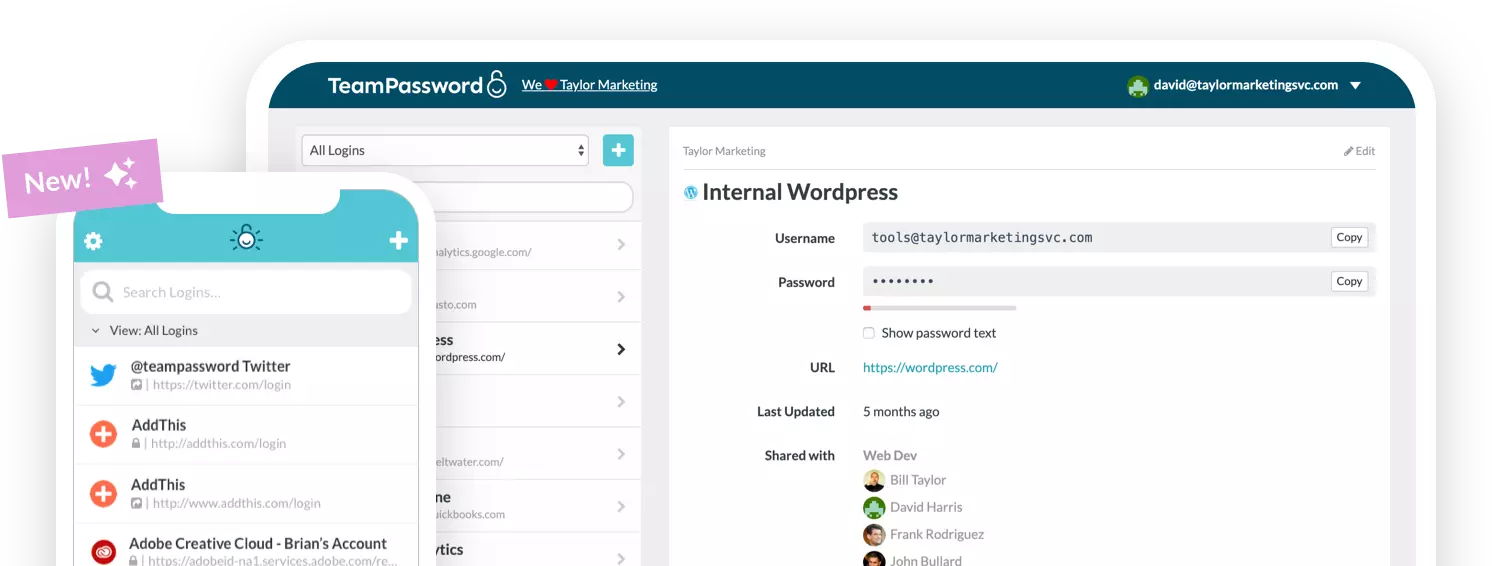
TeamPassword builds access control from groups. You create a group per client, project or department, add the records, and add the people. Every user is an owner, admin or member, and admins can turn off sharing with the whole team so nothing lands in a company-wide bucket by accident. Groups are unlimited with no record caps on Standard, which is $28.92 per user per year with a 3-user minimum. Admins can also require 2FA for the whole team, require Google Sign-In, and set a session timeout from 10 minutes to 12 hours.
On Enterprise ($5.25), the view-only role lets members copy and use a password without it ever being shown on screen, and they cannot edit or delete records. It suits contractors and support staff who should log in but never change a shared credential. It does not stop someone pasting a copied password elsewhere, and no password manager can. Our guide to least-privilege password groups and our role-based access control guide walk through a setup.
What you give up: roles are fixed, with no role builder, and sharing is group-based, so you cannot share one record directly with one person without putting it in a group. A two-person group handles that case, but it is an extra step.
TeamPassword Access Control at a Glance
- Owner, admin and member roles, plus a view-only role on Enterprise
- Unlimited shared groups with no record caps
- Share with the whole team; admins can turn this off
- Activity log with filters and CSV export, plus admin email notifications
- Single sign-on with Microsoft Entra ID (Enterprise; set up by our team)
See all features and pricing.
2. Bitwarden
Best for: teams that want per-collection permissions and, on Enterprise, custom roles, from $4.00 per user per month on Teams.
Bitwarden gives Teams organizations Owner, Admin and User roles, with a Custom role available only on Enterprise. The finer control sits at the collection level: you can grant "View items", "View items, hidden passwords" or "Edit items, hidden passwords", and no plan restriction is stated for those hidden-password options.
Bitwarden is candid that hidden fields "limit but don't prevent access." If custom roles are a hard requirement, Bitwarden is stronger than TeamPassword here; budget for Enterprise, at $6.00 per user per month, to get them.
Bitwarden Access Control at a Glance
- Owner, Admin, User on Teams; Custom role on Enterprise only
- Collection permissions including hidden-password variants
- Vendor states hidden fields do not prevent access
3. 1Password
Best for: organizations that want to separate viewing an item from copying its password, at $8.99 per user per month on Business.
1Password has built-in groups (Owners, Administrators, Team Members, plus Security and Provision Managers when enabled) and custom groups with custom permissions. The catch is the tier. On Teams, the "Allow Viewing" permission includes viewing and copying passwords, and there is no option to let someone use an item without revealing or copying it. Business splits "View Items" from "View and Copy Passwords" and adds custom groups.
If that split matters, Business is a clean implementation at more than three times TeamPassword Standard.
1Password Access Control at a Glance
- Built-in groups on every team plan; custom groups on Business
- Granular vault permissions on Business only
- Teams viewing permission includes copying
- Business at $8.99 per user per month
4. Keeper
Best for: larger organizations that need delegated administration across departments, from $4.00 per user per month on Business (Enterprise by quote).
Keeper lets administrators create roles at any node of the organization, and its pricing page lists role-based access control under Enterprise, with delegated administration on Business and Enterprise. Records can be shared "View Only", and team restrictions can disable re-shares and edits. The Privacy Screen setting masks passwords, though Keeper itself says the masking "is only visual." We could not confirm which tier includes Privacy Screen.
Business Starter is $2.00 for 5 to 10 users and Business is $4.00, but Enterprise, where role-based access control is listed, is quote only. For a 10-person team, that structure is overhead.
Keeper Access Control at a Glance
- Admin-created roles at any organizational node
- Delegated administration on Business and Enterprise
- View Only record permission; edits and re-shares can be restricted
- Password masking described by Keeper as visual only
5. NordPass
Best for: teams of five or more already on NordPass Business, at $3.99 per user per month (1-year plan).
NordPass has Owner, Admin and User roles. Shared items can be "Can view", which includes view, copy and autofill, or "Can autofill", which is autofill only and is not available for passkeys and secure notes. Groups and shared folders are Business and Enterprise only, and org-wide permission control through Sharing Hub is limited to Enterprise owners.
The Teams plan ($1.99) is sold as a 10-user pack and has no groups, so access control there is item by item.
NordPass Access Control at a Glance
- Owner, Admin, User roles
- "Can autofill" access level, except for passkeys and secure notes
- Groups on Business and Enterprise; 5-user minimum
- Sharing Hub on Enterprise only
6. Zoho Vault
Best for: companies already running Zoho apps.
Zoho Vault has Super admin, Admin and User roles, with no custom roles mentioned in its help center. Sharing levels include "View" and "One click login only", which prevents viewing a password in plain text. Zoho notes that a skilled user could still extract a "login only" password. Password sharing starts on Standard, and user groups are Professional and Enterprise only, with a 5-user minimum.
Zoho Vault Access Control at a Glance
- Super admin, Admin, User roles
- "One click login only" sharing, which Zoho says can be bypassed
- Groups on Professional and Enterprise only
- No sharing on the Free plan
7. LastPass
Best for: existing LastPass Business customers, at $7.00 per user per month.
LastPass shared folders can be set to "Read Only" and "Hide Passwords". Admin roles, groups, and assigning a group to a shared folder are Business features. Teams, at $4.25, has none of those and is capped at 50 users.
LastPass Access Control at a Glance
- Read Only and Hide Passwords on shared folders
- Admin roles on Business and Business Max only
- Groups on Business only
- Teams capped at 50 users
How to Choose
- Small or mid-size team, non-technical users, tight budget: TeamPassword Standard at $2.41, adding Enterprise at $5.25 if you want view-only.
- You need custom roles: Bitwarden Enterprise, or Keeper if you also need delegated admin.
- You want viewing and copying as separate permissions: 1Password Business at $8.99.
- You are on LastPass Teams or NordPass Teams and need groups: you will have to move up a tier or switch.
- You already pay for Zoho: Zoho Vault Professional, for groups.
Frequently Asked Questions
Which password manager has the best access control in 2027?
For small and mid-size teams, TeamPassword: unlimited groups and owner, admin and member roles on the $2.41 Standard plan, plus a view-only role on Enterprise. If you need custom roles, Bitwarden Enterprise is stronger, and Keeper suits large organizations that need delegated administration.
Can a password manager stop employees from copying passwords?
No. If someone can use a password, they can copy it. Bitwarden, Keeper, Dashlane and Zoho all say their hidden-password options are visual or can be bypassed. The protections that work are least-privilege groups, fast revocation and rotating passwords after someone leaves.
What does a view-only role do in a password manager?
In TeamPassword Enterprise, members with the view-only role can copy and use a password without it ever being shown on screen, and they cannot edit or delete records. It prevents accidental or unauthorized changes to shared credentials. It does not stop someone pasting a copied password elsewhere.
Which plan do I need for role-based access control?
It varies by vendor. TeamPassword includes roles and unlimited groups on Standard at $2.41 per user per month, with view-only on Enterprise at $5.25. 1Password needs Business at $8.99 for custom groups, Bitwarden needs Enterprise for custom roles, and LastPass and NordPass need Business for groups.
Can I share one password with just one person in TeamPassword?
Not directly. Sharing in TeamPassword is group-based, so to share a single record with one person you put it in a group that only they and you belong to. Groups are unlimited on every plan, so this costs nothing extra.
Can I create my own roles in TeamPassword?
No. Roles are fixed: owner, admin and member, plus a view-only role on Enterprise. If you need to define your own roles, Bitwarden Enterprise and Keeper both offer that.
Try TeamPassword
If you want least-privilege sharing your whole team will actually use, TeamPassword is built for it.
- Owner, admin and member roles
- Unlimited shared groups with no record caps
- View-only role (Enterprise): members can copy and use a password without it ever being shown on screen, and cannot edit or delete records
- Activity log of record views, edits, deletions, attachments, invitations, logins and security-setting changes, with filters and CSV export
- Require 2FA for the whole team
- Standard $2.41 per user per month billed annually ($2.88 monthly); Enterprise $5.25 ($6.30 monthly); 3-user minimum
Try TeamPassword free for 14 days
More in This Series
- Best Password Managers with a Built-in Authenticator
- Best Password Managers with Activity Logs
- Best Password Managers for Sharing Passkeys
- Best Password Managers with Admin Security Controls
- Best Password Managers with Autofill for Teams
- Best Password Managers with a Passphrase Generator
- Best Password Managers with One-Time Secret Links
- Best Password Managers with Group-Based Sharing
- Cheapest Business Password Managers
- Best Password Managers for Teams