
A password breach at a startup is embarrassing. At an enterprise, it’s a multi-million dollar event that puts you in the regulatory crosshairs of SOC 2, GDPR, or HIPAA. The stakes are fundamentally different — and so are the tools.
Enterprise password management isn’t just about keeping bad actors out. It’s about proving to auditors that you have total control over who can access what, when, and why. A consumer-grade password manager can’t deliver the detailed audit logs, role-based access controls, and policy enforcement engines that auditors demand. At the enterprise scale, this isn’t password hygiene — it’s a critical component of your governance, risk, and compliance (GRC) strategy.
This guide reviews what corporations actually need from an enterprise password manager, why it’s indispensable, and how the leading enterprise password management solutions stack up. We’ll do a deep, criteria-driven comparison of five top-rated products: TeamPassword, Keeper Security, 1Password, Bitwarden, and Dashlane.
Key Takeaways
- Necessity: An enterprise password manager is essential for security, compliance, and productivity at scale — it covers the long tail of credentials your SSO can’t federate.
- Core features: The non-negotiables are role-based access control (RBAC), SSO/SAML integration, detailed audit logs, and SCIM-driven user provisioning.
- Right-sizing: TeamPassword leads on simplicity and team-wide adoption; Keeper Security on regulatory depth; 1Password on developer experience; Bitwarden on open-source transparency; Dashlane on bundled privacy features.
Why an Enterprise Password Manager Is Non-Negotiable for Modern Businesses
The risks of poor password hygiene in a business setting are staggering. While an individual might suffer a compromised email, a company faces data breaches, financial loss, and reputational damage. A dedicated enterprise password manager isn’t a productivity nice-to-have — it’s table stakes for several reasons.
The Proliferation of Digital Accounts
Modern businesses use dozens, if not hundreds, of SaaS applications. Each requires unique login credentials. Without a centralized system, employees often resort to reusing weak passwords or jotting them down on sticky notes — some of the most dangerous ways to store passwords.
The Growing Threat Landscape
Cybercriminals are constantly evolving their tactics. Credential stuffing, brute-force attacks, and spear phishing are rampant. AI-augmented password cracking has shortened the time required to compromise weak credentials. An enterprise password manager helps withstand these assaults by enforcing strong, unique passwords for every account and tightening the blast radius when a single credential is compromised.
Employee Onboarding and Offboarding
When an employee joins or leaves, managing their access can be a nightmare. Manually updating passwords across applications is time-consuming and prone to error. An enterprise password management solution automates this process, ensuring seamless onboarding and immediate revocation of access upon departure — closing one of the most common breach vectors in mid-market organizations. This is especially true for IT teams and managed service providers; our guide to password management software for IT and MSPs digs into their specific needs.
Regulatory Compliance and Auditing
Many industries are subject to strict data security regulations. Demonstrating strong credential security is a fundamental requirement for SOC 2 password security compliance, HIPAA, GDPR, and emerging frameworks like the EU AI Act. An enterprise password manager provides auditable logs of who accessed what and when, simplifying these efforts significantly. The stakes are highest in heavily regulated sectors — see our deep dive on cybersecurity for financial services for an industry-specific view.
What to Look For in an Enterprise Password Manager
Enterprise-level companies have distinct needs that go far beyond what a personal password manager offers. Here are the key features and considerations:
Robust Security Architecture
Your enterprise password manager must be built on a foundation of security. Look for end-to-end, zero-knowledge encryption. This means all data is encrypted on your device before being sent to the provider’s servers, ensuring that even the provider cannot access your sensitive information. Also essential is support for robust Multi-Factor Authentication (MFA) and a history of regular, independent security audits.
Pro Tip: Ask a potential vendor for their most recent SOC 2 Type II report and any third-party penetration test summaries. Transparency on these documents is a strong indicator of security maturity.
Advanced Access Control & Permissions
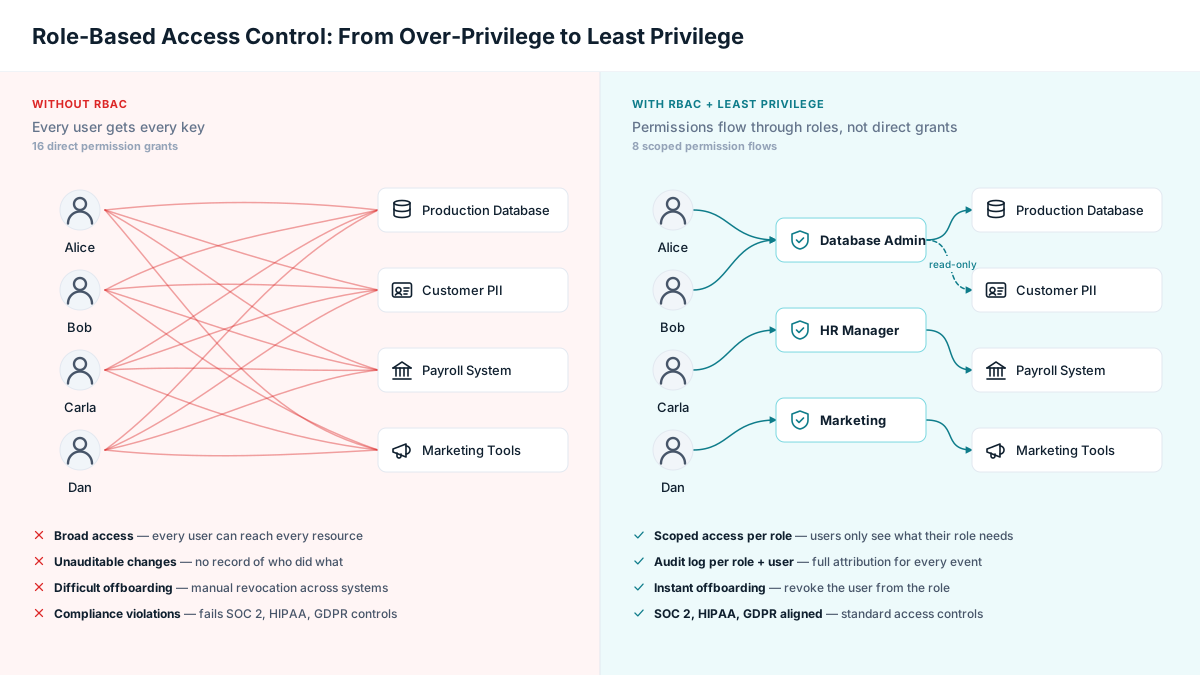
Not every employee needs access to every credential. A strong enterprise password manager offers Role-Based Access Control (RBAC), allowing administrators to define roles and assign granular permissions. This adheres to the Principle of Least Privilege (PoLP), a core cybersecurity concept.
Audit Trails and Comprehensive Reporting
For security monitoring and compliance, comprehensive logging is vital. The system should record every action: who accessed a password, when it was changed, who it was shared with, and from which device or IP address. Detailed reports on password hygiene and user access are crucial for security reviews and audits, and event log streaming to your SIEM (Splunk, Datadog, etc.) is a meaningful enterprise differentiator.
SSO, SAML, and Directory Service Integration
An enterprise password manager should fit seamlessly into your existing identity stack. Look for integrations with Single Sign-On providers like Okta, Azure AD, Google Workspace, or JumpCloud for streamlined authentication, plus syncing with directory services like Active Directory or LDAP for simplified user management. The strongest products support both SAML 2.0 and OIDC out of the box.
Secrets Management for DevOps Teams
Modern engineering teams don’t just need to share passwords — they need to manage API keys, SSH credentials, database connection strings, and other machine-to-machine secrets. Look for an enterprise password management solution that offers structured secrets storage, command-line interface (CLI) access, and integrations with CI/CD pipelines. Without this, your developers will route around your password manager entirely and store secrets in .env files, GitHub repos, or shared chat — recreating the exact problem you set out to solve.
Provisioning and Deprovisioning at Scale
At enterprise scale, manually creating and revoking accounts is unsustainable. Look for support for SCIM (System for Cross-domain Identity Management), the open standard that automates user lifecycle management. With SCIM, when HR adds a new employee in your identity provider, they’re automatically provisioned in your password manager with the right group assignments. When they leave, access is revoked in seconds. Without SCIM, IT teams spend weeks chasing access changes after every personnel event — a common audit finding.
Enterprise Password Management Solutions: At-a-Glance Comparison
| Solution | Best For | Plan Tiers | SSO & SCIM | Deployment | Free Trial |
|---|---|---|---|---|---|
| TeamPassword | Best Overall — team-first adoption | Business + Enterprise | SSO | Cloud | 14 days |
| Keeper Security | Best for compliance-heavy enterprises | Business + Enterprise | Yes | Cloud | 14 days |
| 1Password | Best for distributed engineering teams | Business + Business Plus + Enterprise | Yes | Cloud | 14 days |
| Bitwarden | Best open-source option | Teams + Enterprise + Self-Hosted | Yes (Enterprise tier) | Cloud or Self-Hosted | 7 days |
| Dashlane | Best for built-in VPN and privacy suite | Business + Business Plus + Enterprise | Yes | Cloud | 14 days |
Full Transparency: This guide was created by the team at TeamPassword. We’ve done our best to provide an objective, comprehensive review of all five tools, but we’re obviously proud of what we’ve built — and where appropriate, we’ll tell you when one of the others is a better fit for your situation.
How We Evaluated Enterprise Password Management Solutions
Five top-rated enterprise password managers is a crowded set, and not every comparison guide on the internet is honest about how it picks. Here’s the framework we used.
Each product in this guide was evaluated against the following criteria:
- MFA depth and phishing resistance. The range and strength of multi-factor authentication options the vendor supports — including hardware security keys, biometric authenticators, push-based mobile prompts, and phishing-resistant standards like FIDO2 and passkeys.
- Default password generation policy. What the vendor generates out of the box (length, character classes, passphrase support) and how easily an administrator can enforce stronger organization-wide defaults.
- Public security documentation. The depth of publicly available technical security material — SOC 2 Type II reports, white papers describing the encryption model, third-party penetration test summaries, and clearly documented threat models.
- Track record on security incidents. How the vendor has historically responded to security events affecting their own service: transparency around root-cause analysis, customer communication, and the speed and scope of remediation.
- Value relative to peers. Pricing measured against comparable products in the same tier, with attention to per-user cost at the SMB level, contract structure at the enterprise level, and whether key compliance features are gated behind premium add-ons.
- Daily-use experience. The breadth of additional features (secure file storage, dark web monitoring, breach alerts, passkey support, integrated TOTP) balanced against the usability of the day-to-day interface across desktop, mobile, and browser extensions.
- Customer support quality. The accessibility, responsiveness, and contractual support guarantees offered to business and enterprise customers — including documented response SLAs at the enterprise tier.
We deliberately did not weight any single factor as decisive. An enterprise password manager that excels at compliance reporting but ships a clunky end-user app will fail in adoption — which means it fails as a security tool, regardless of how good the admin console looks. The right choice is almost always the one that fits your organization’s specific risk profile, technical sophistication, and people-and-process reality.
A Closer Look at the Top 5 Enterprise Password Management Solutions
1. TeamPassword — Best Overall for Team-First Adoption
Best for: Companies that need every team member — not just the security-conscious power user — to actually open and use the password manager every day.
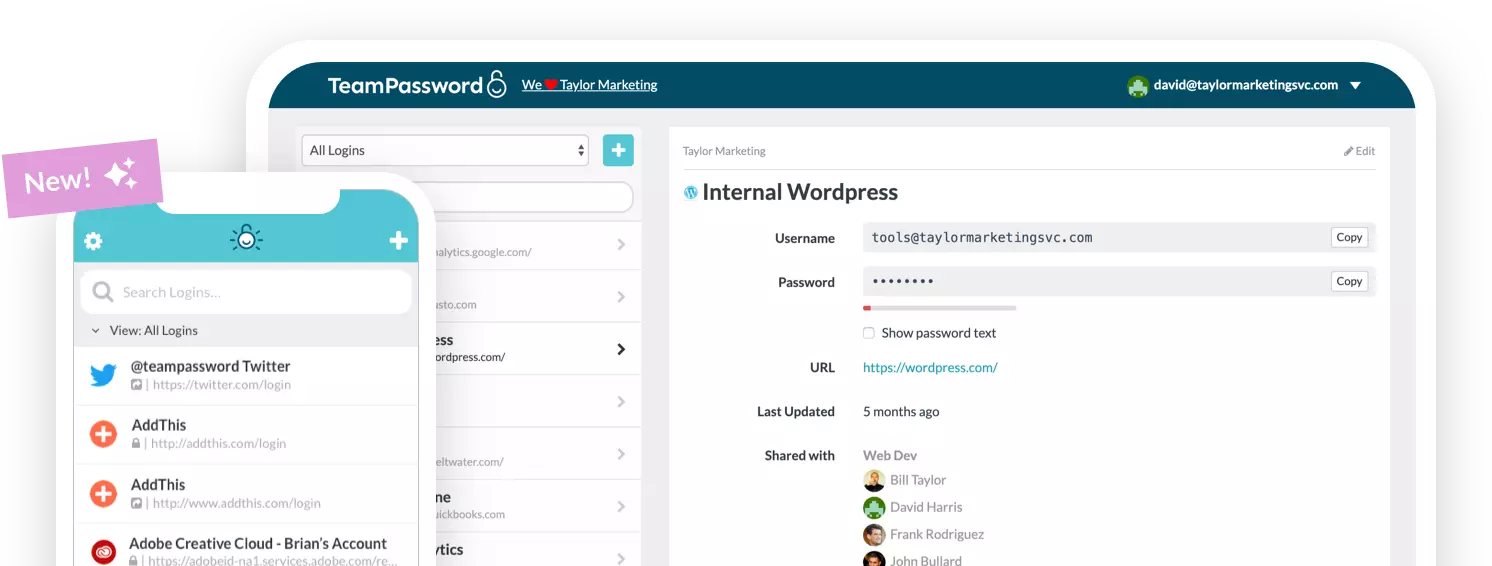
TeamPassword is built around a single thesis: a password manager that 60% of your team won’t open is a worse security outcome than a simpler tool 100% of your team uses. The interface is intentionally narrow — no sprawling secure-file vault, no built-in VPN, no dark-web-monitoring dashboards distracting from the core job. What you get is fast group creation, frictionless credential sharing, role-based access control, and an integrated TOTP authenticator so your 2FA codes sit alongside the passwords they unlock.
For administrators, the workflow is clean: create groups that mirror your org structure, assign credentials to those groups, set permissions, and watch the activity log. The SSO and SCIM integrations land users in the right groups automatically. The audit trail captures the events auditors actually request — who viewed which credential, who reshared it, when each was last rotated.
Where it deliberately doesn’t compete: TeamPassword isn’t trying to be a secrets vault for your DevOps team or a privileged-access-management platform for your sysadmins. If your security org’s roadmap requires unified secrets management across humans, services, and infrastructure, you’ll layer TeamPassword alongside a dedicated tool rather than expecting it to do everything.
Choose TeamPassword when:
- The most painful problem in your org is “passwords are being shared insecurely in Slack and spreadsheets”
- You want every employee — not just engineers — productive on the platform within their first day
- You care more about team-wide secure sharing and high adoption than feature count
Plan structure: Business and Enterprise tiers, both billed per user. Annual commitments offer the best per-seat economics.
2. Keeper Security — Best for Compliance-Heavy Enterprises
Best for: Regulated industries (finance, healthcare, public sector, defense contracting) where compliance reporting and audit trail depth are the primary buying criteria.
Keeper Security is a full cybersecurity platform that happens to include a password manager. The flagship Business and Enterprise plans bundle secure file storage, dark web monitoring (BreachWatch), encrypted messaging (KeeperChat), and an optional privileged access manager (KeeperPAM). For compliance-driven enterprises, this consolidation is genuinely useful — one vendor relationship, one SOC 2 report to review, one set of contractual privacy commitments.
The admin console is the deepest in this comparison. Role-based access control is fully configurable, SCIM provisioning is supported out of the box, and audit log retention is long enough to satisfy most regulators. Keeper holds FedRAMP authorization and StateRAMP authorization, plus SOC 2 Type II, ISO 27001, and HIPAA/GDPR compliance documentation — a stack rarely matched elsewhere in this category.
Trade-offs: that breadth comes with administrative overhead. Configuring Keeper well takes meaningful time — you’re not getting from sign-up to 100% adoption in an afternoon. The user interface is functional but not the prettiest in the category, and smaller teams sometimes find the feature set overwhelming relative to what they actually need. For organizations exploring alternatives, several Keeper alternatives deliver a lighter touch.
Choose Keeper Security when:
- You operate in finance, healthcare, government, or defense
- You need FedRAMP authorization for federal contracting eligibility
- You want a single vendor handling passwords, secrets, file vaulting, and breach monitoring
Plan structure: Business and Enterprise tiers, with compliance add-ons (Advanced Reporting & Alerts Module, KeeperPAM) sold separately at the enterprise level.
3. 1Password — Best for Distributed Engineering Teams
Best for: Engineering-led organizations where developers are first-class citizens and the password manager doubles as a secrets-management tool.
1Password has quietly become the password manager that meets developers in their actual workflow. The 1Password CLI lets engineers reference secrets in build scripts and infrastructure-as-code without checking them into git. The SSH agent integration makes key management as smooth as password autofill. Native integrations with Terraform, Kubernetes secrets, and CI/CD platforms mean sensitive infrastructure credentials live in the same vault as the team’s Salesforce login.
The Secret Key model is unique: in addition to a master password, each user has a 128-bit Secret Key automatically generated at sign-up that’s required for decryption. Even if an attacker compromises 1Password’s servers and brute-forces a master password, they still can’t decrypt the vault without the Secret Key residing on the user’s device. It’s a stronger model than most competitors offer.
For end-users, the interface is best-in-class. Travel Mode temporarily strips designated vaults from devices crossing borders. Watchtower flags weak, reused, and breached passwords. The browser extension and mobile app feel like consumer products, which translates directly to high adoption rates.
Trade-offs: the per-seat pricing is the highest in this comparison. Some teams find the dual-credential model (master password + Secret Key) creates friction when employees need to re-authenticate on a new device or after a phone replacement.
Choose 1Password when:
- Your developers are heavy users and you want one tool for both passwords and infrastructure secrets
- You’re willing to pay a premium for the best end-user experience in the category
- Your workforce operates across multiple geographies and benefits from first-class travel-mode privacy features
Plan structure: Business, Business Plus, and Enterprise tiers.
4. Bitwarden — Best Open-Source Option
Best for: Security-conscious organizations that prioritize code transparency, self-hosting flexibility, or per-seat budget efficiency — without sacrificing enterprise capabilities.
Bitwarden is the only widely-deployed enterprise password manager whose entire codebase is open source. Server, client apps, browser extensions, mobile apps — all on GitHub, all auditable by anyone with the patience to read the source. For organizations whose security model favors verifiable trust over proprietary assurances, this is decisive.
The self-hosting option is the second major differentiator. You can run Bitwarden in your own AWS, Azure, or on-prem environment. For organizations subject to data residency requirements, air-gapped environments, or an institutional preference for owning the deployment, no other product in this category offers an equivalent.
Functionally, Bitwarden covers the enterprise table stakes — RBAC, SSO/SAML, SCIM provisioning, AES-256 encryption, FIDO2/WebAuthn for MFA — at a per-seat price below 1Password and Keeper. The Enterprise tier adds password policy enforcement, advanced reporting, and event log integration with your SIEM.
Trade-offs: the user interface is functional but plainer than 1Password or Dashlane. Some admin workflows take more clicks than they should. Self-hosting demands real DevOps capacity to run safely in production — not all "free" deployments are actually free once you account for SRE time. Teams sometimes look at Bitwarden alternatives when a polished UX matters more than open-source provenance.
Choose Bitwarden when:
- Open-source transparency is part of your security policy or your customer sales pitch
- You need to self-host for data residency, air-gap, or sovereignty reasons
- Per-seat budget pressure is real but you’re not willing to compromise on encryption strength or audit logging
Plan structure: Teams, Enterprise, and Self-Hosted (Bitwarden licenses are charged per user; self-hosted infrastructure costs are separate and yours to manage).
5. Dashlane — Best for Built-In VPN and Privacy Suite
Best for: Companies whose security model bundles password management with broader employee-privacy protections, particularly distributed workforces operating from untrusted networks.
Dashlane’s positioning has shifted toward a digital-trust platform over the past two years. The Business and Enterprise plans bundle a password manager with an integrated VPN, dark web monitoring, and breach alerts that surface compromised employee credentials proactively. For organizations whose remote workforce regularly works from coffee shops, hotel Wi-Fi, or other untrusted networks, the bundled VPN is genuinely useful — it removes a separate procurement and integration decision.
On the password management side, Dashlane covers the enterprise basics: RBAC, SSO/SAML, SCIM provisioning, and end-to-end zero-knowledge encryption. The autofill engine is among the best in the category — it tends to recognize obscure or oddly-built login forms that other vaults stumble on. Passkey support is well-integrated, and the admin console’s health-score dashboards make policy violations visible at a glance.
Trade-offs: the bundled VPN means you’re partly buying a product Dashlane resells rather than builds from scratch. Pricing sits at the higher end of the category, especially when you compare against the underlying cost of a standalone enterprise VPN. The admin reporting is solid but not at Keeper’s depth for compliance-heavy industries. For direct head-to-head comparisons, see our writeups on Dashlane vs. Bitwarden and Dashlane vs. NordPass.
Choose Dashlane when:
- You want one bundled bill for password management, employee VPN, and breach monitoring
- Your remote workforce regularly uses untrusted networks and you don’t already have a separate VPN provider
- Best-in-class autofill across legacy and quirky web apps matters for adoption
Plan structure: Business, Business Plus, and Enterprise tiers, with VPN included from the Business tier and above.
The Migration Path: How to Switch to an Enterprise Password Manager
Picking the right tool is half the battle. The other half is actually moving your organization from whatever you’re using today — shared spreadsheets, browser-saved passwords, a consumer-grade password manager, an outdated enterprise vault — onto the new platform without losing credentials or productivity.
Most successful enterprise password manager migrations follow a similar five-step pattern.
Step 1: Audit what you’re currently using
Before you migrate, you need a clean inventory. Pull a list of every shared credential currently living in spreadsheets, Notion docs, browser-saved passwords, and sticky-note backups. Identify owners. Tag credentials by team and sensitivity. This audit alone often reveals more accounts than leadership knew existed — including orphaned service accounts that no one has rotated in years.
Step 2: Pilot with one team
Don’t roll out to 500 employees on day one. Pick a single team — usually the security team, or a smaller cross-functional unit — and migrate them first. You’ll learn what training materials need updating, which integrations break, and what your real onboarding time per user looks like. The pilot phase typically surfaces 80% of the issues you’ll encounter in a full rollout, for a fraction of the disruption.
Step 3: Import credentials in bulk
Every enterprise password manager in this guide supports CSV import. Most also support direct migration from competing products. Plan the import for a low-traffic period and verify a representative sample of credentials post-import — incorrect import field mapping is the most common cause of post-launch support ticket volume.
Step 4: Configure SSO and SCIM before broad rollout
The biggest mistake we see: companies invite users one-by-one via email instead of provisioning through their identity provider. Set up Okta, Azure AD, or Google Workspace SSO first. Configure SCIM groups to mirror your org structure. Then provisioning new users becomes automatic, and the rollout effort drops by an order of magnitude.
Step 5: Plan for sunset of the old system
Set a hard cutoff date — usually 30-60 days after broad rollout — after which the old password storage becomes read-only and is then deleted. Without a forcing function, employees will keep dual-storing credentials indefinitely, defeating the security gains. Communicating the sunset date clearly and early is the single most predictive factor in whether a migration succeeds.
Realistic timeline by company size: For a 100-person company, plan on 2-4 weeks from contract signing to broad rollout, plus another 4-6 weeks before you can confidently sunset the previous system. For organizations over 1,000 employees, plan for 6-12 weeks. Most of the time is consumed by people-and-process change management, not engineering.
A Day in the Life with an Enterprise Password Manager
Imagine a workday without the chaos of forgotten passwords or shared Excel sheets. In the morning, an employee unlocks their vault with their corporate SSO — no separate master password to memorize. Browser extensions then auto-fill logins for their CRM, email, and project management tools. When the marketing team needs access to a shared social media account, the team lead grants them access to the corresponding group in the vault — no insecure credential-pasting in Slack required. The audit log records the assignment in real time, ready for the next SOC 2 review. When that same employee leaves the company two years later, their access to every shared credential is revoked the moment HR marks them as terminated in the identity provider — closing the offboarding security gap that creates so many post-departure breach incidents.
Frequently Asked Questions About Enterprise Password Management
How do enterprise password managers handle SSO?
Enterprise password managers integrate with your identity provider (Okta, Azure AD, Google Workspace, JumpCloud) using SAML 2.0 or OIDC. Once configured, users log into the password manager via their existing corporate SSO — no separate password to remember. The password manager then becomes the vault for everything SSO doesn’t cover: shared social media accounts, vendor portals, legacy systems, and the long tail of SaaS apps your IT team hasn’t federated yet. SSO and password management are complementary, not redundant.
Do enterprise password managers work with legacy systems?
Yes — and this is actually a major reason enterprises adopt them. Most legacy systems (mainframes, on-prem ERP, older internal tools) don’t support modern SSO, so they sit outside your identity provider’s coverage. An enterprise password manager fills exactly this gap. You can store legacy credentials in shared vaults, control access via RBAC, audit every access event, and rotate passwords on a schedule — without ever modifying the legacy system itself.
How do enterprise password managers support SOC 2, HIPAA, and GDPR compliance?
Enterprise password managers help with three specific compliance demands. First, they create an auditable record of who accessed which credentials and when (satisfies most SOC 2 control objectives around access management). Second, they enforce strong password policies and MFA at the credential level (relevant for HIPAA technical safeguards and the GDPR principle of integrity and confidentiality). Third, they support automated user provisioning and deprovisioning, ensuring access is revoked immediately when employees leave — a frequent audit finding in non-automated environments. The password manager isn’t a complete compliance program by itself, but it’s a foundational piece of one. See our deeper guide on SOC 2 password requirements.
Do enterprises need a password manager if they already have SSO and MFA?
Yes. SSO covers the SaaS apps that support it, but every enterprise has a tail of legacy systems, third-party portals, vendor accounts, and shared service credentials (marketing tool logins, social media accounts, billing portals) that SSO doesn’t touch. MFA protects the authentication moment but doesn’t help you securely share a credential across a team. An enterprise password manager fills both gaps — it’s where the credentials SSO can’t federate live, and it’s how a marketing team safely shares the company social account without anyone pasting it into Slack.
What’s the difference between an enterprise password manager and an enterprise password vault?
The terms are used interchangeably in vendor marketing, but there’s a subtle distinction worth understanding. A “password vault” typically describes the storage layer — the encrypted, zero-knowledge container that holds credentials and is individually decrypted on each user’s device. An “enterprise password manager” describes the full platform: the vault plus admin tools, RBAC, audit logs, SSO/SCIM integration, browser and mobile clients, and policy enforcement. Every modern enterprise password manager includes a vault. Not every product that markets itself as a vault includes the full management layer enterprises actually need. Our explainer on password vaulting covers the storage-layer details.
How long does enterprise password manager deployment take?
For a 50-100 person company starting from spreadsheets or browser-saved passwords: 1-2 weeks from contract signing to roughly 80% rollout, with the remaining users onboarded over the following 2-4 weeks. For larger organizations (500-2,000 employees), plan on 4-8 weeks total, mostly driven by SSO/SCIM integration testing and training sessions for non-technical staff. The actual technical setup — provisioning admin accounts, configuring SSO, importing credentials — typically takes less than a day. The rest of the timeline is people-and-process change management.
What is the implementation process like?
Most cloud-based enterprise password managers can be set up in a few hours. The process typically involves setting up the admin account, integrating with your directory service (like Azure AD or Google Workspace) to import users, creating user groups and roles, and then inviting employees to install the browser extension and mobile apps. Following the five-step migration path above — audit, pilot, bulk import, SSO/SCIM config, and old-system sunset — is the most reliable way to get to high adoption quickly.
How do I get my employees to actually use the password manager?
Adoption is everything. Choose a tool with an intuitive, user-friendly interface — this is often a stronger predictor of success than feature count. Conduct a brief training session showing employees how the tool saves them time and frustration (auto-fill alone usually wins skeptics). Finally, enforce its use by making the password manager the only company-sanctioned way to store and share credentials, with a clearly communicated sunset date for legacy storage methods.
Choosing the Right Enterprise Password Manager for Your Company’s Future
In an era where cyber threats are constant and increasingly AI-augmented, relying on manual, insecure password practices is a recipe for disaster. An enterprise password management solution is a foundational security tool that protects your most sensitive digital assets — the credentials that, when exposed, become the entry point for the most expensive breaches in your industry.
Choosing the right enterprise password manager requires careful consideration of your organization’s size, regulatory environment, technical sophistication, and culture around adoption. Whether you opt for the collaborative simplicity of TeamPassword, the compliance depth of Keeper Security, the developer-first ergonomics of 1Password, the transparency of open-source Bitwarden, or the bundled privacy suite of Dashlane — investing in a serious business password manager is an investment in your company’s security posture and operational resilience. For broader context on credential management strategy, see our complete guide to password management.
Ready to Secure Your Team’s Passwords?
You’ve just read a comprehensive guide on the complexities of enterprise password management. You understand the risks of insecure credential practices and the need for a robust solution. But you also know the reality: many “enterprise-grade” tools are over-engineered, difficult to implement, and a nightmare for your team to adopt.
TeamPassword was built on a different philosophy: the most secure password is the one your team actually uses correctly, every single time. We focus on making security invisible and collaboration seamless.
Imagine a world where:
- Onboarding a new employee takes minutes, not hours, with all their necessary logins ready to go on day one.
- Password-related help desk tickets become a distant memory, freeing up your IT team for higher-leverage work.
- Your teams can share credentials securely with a few clicks, without ever exposing a password in a spreadsheet, a Slack channel, or a sticky note again.
That’s not a far-off dream — it’s what you can experience in the next 15 minutes. See for yourself why thousands of teams rely on TeamPassword to eliminate password chaos and get back to work.
[Start Your Free 14-Day Trial] (No credit card required, setup takes less than 5 minutes)