The largest healthcare data breach in U.S. history didn't start with a genius hacker or a zero-day exploit. It started with a password.
In February 2024, attackers walked into Change Healthcare through a remote-access portal that was missing one basic protection: multi-factor authentication. They used login credentials that should never have worked. The fallout eventually touched an estimated 190 million people, according to Cybersecurity Dive, making it the biggest reported health-data breach the country has seen.
Here's the uncomfortable part for anyone running a therapy practice. Most speech, occupational, and physical therapy practices will never be Change Healthcare. But they run on the exact same weak link, a pile of reused and shared passwords, with far fewer defenses standing behind it.
This is a guide to fixing that weak link. We'll cover why small therapy practices are targets, what makes your password needs genuinely different from a generic business, the five password managers worth considering in 2026, and how the right one quietly handles a chunk of your HIPAA obligations along the way.
Why therapy practices are a target nobody warns them about
If you're a speech-language pathologist, occupational therapist, or physical therapist, you probably think of yourself as a clinician. You went to school to help people talk, move, and recover, not to run a data-security operation. That's exactly the gap attackers count on.
An SLP, OT, or PT practice is a small business sitting on a concentrated pile of highly sensitive protected health information (PHI). And medical records are worth real money. On the dark web, a full medical record routinely sells for far more than a stolen credit card number, because it can't be cancelled and reissued the way a card can. A card gets frozen in an afternoon. A person's diagnosis history is theirs for life.
Small practices get hit precisely because they hold that valuable data but rarely have the security budget or dedicated IT of a hospital. And attackers don't hand-pick victims by size. They automate. Bots spray stolen credentials across thousands of logins at once and see what opens. Being a three-person clinic doesn't make you invisible. It makes you unguarded.
Now layer on what these three fields actually document. Speech therapists handle pediatric caseloads, developmental and cognitive evaluations, and IEP and school records tied to named children. Occupational therapists document disability, daily-living limitations, and behavioral and mental-health notes. Physical therapists hold injury histories, imaging, and functional assessments that can surface in insurance and legal disputes. Much of this involves minors, and nearly all of it follows a patient for the rest of their life. The sensitivity multiplier here is enormous.
Which brings us back to Change Healthcare. The breach didn't enter through some exotic flaw in medical encryption. It entered through stolen credentials on a Citrix remote-access portal that lacked MFA, a detail UnitedHealth's CEO confirmed in Congressional testimony in May 2024. The attack was later attributed to the ALPHV/BlackCat ransomware group (Reuters). Credential hygiene wasn't box-ticking bureaucracy in that story. It was the actual thing that broke.
For a therapy practice, the front door isn't your EHR vendor's encryption. It's the login sitting on a sticky note, in a shared Google Doc, or reused across five different tools. That's the door worth locking first.
Why therapists can't just use the browser's built-in password saver
Plenty of "best password manager" lists exist, and almost all of them ignore the constraints that make a therapy practice different. Saving passwords in Chrome feels free and easy, but it fails most of the requirements below. Here's what actually matters for SLP, OT, and PT practices.
HIPAA-grade access controls. The HIPAA Security Rule requires covered entities to limit ePHI access to authorized users, assign unique user IDs, and verify identity before granting access (45 CFR 164.312). A single shared clinic login that everyone types in, with no individual accountability, fails that requirement on its face. See the HHS Security Rule guidance for the specifics.
A messy, niche software stack. Therapy practices juggle logins that generic tools never account for. There's the EHR or practice-management platform (SimplePractice, WebPT, Fusion Web Clinic, TheraNest, Prompt EMR, Raintree), plus telehealth apps, billing and clearinghouse portals, scheduling tools, patient-communication platforms, and standardized assessment systems. Every one of those is a separate credential you're responsible for protecting.
Secure sharing without password-sharing. Front-desk staff, billing contractors, and covering clinicians frequently need access to the same accounts. The right manager lets you share access without ever exposing the underlying password, and revoke that access the moment it's no longer needed. Texting a login to a covering PT is the exact habit you're trying to kill. Here's how to safely share passwords with coworkers.
Personal devices, no BYOD policy. Many therapists, especially contractors and per-diem or school-based clinicians, work off personal laptops and phones. Passwords saved in a personal Chrome profile become a compliance and offboarding headache the day that person leaves, because you have no way to pull them back. (Worth reading: are Chrome passwords safe?)
High turnover and contractor churn. Per-diem SLPs, travel PTs, and contract OTs come and go constantly. When they leave, their access has to leave with them, immediately and completely. If offboarding means "hoping they forgot the shared password," you have an open door you can't see.
Two-factor authentication built in. Because so much of a small practice runs on personal email and personal devices, 2FA is non-negotiable. It's also headed toward being legally required: the 2025 HHS Security Rule proposed update (NPRM) would move MFA from "addressable" to effectively mandatory for systems that touch ePHI. Details are in the HHS Security Rule NPRM.
Runs without an IT department. A solo SLP or a three-person PT clinic is not going to hire a system administrator. If the tool isn't close to plug-and-play, it won't get adopted, and staff will quietly fall back to a shared password sheet. Adoption is a security feature. A manager nobody uses protects nothing.
The 5 best password managers for speech, OT, and PT practices
"Best" depends on your practice size and your team's technical comfort. A solo speech therapist and a ten-person PT clinic with front-desk and billing staff have genuinely different needs. Here's a quick comparison, followed by the detail on each.
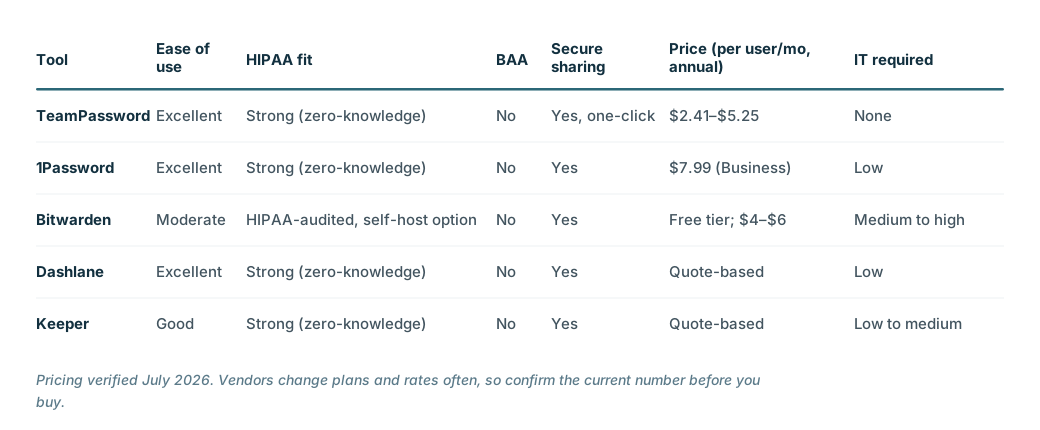
Pricing verified July 2026. Vendors change plans and rates often, so confirm the current number before you buy.
A word about BAAs, because it trips up a lot of clinics. A password manager that stores only credentials is generally not a HIPAA "business associate" the way your EHR vendor is, because it isn't creating, receiving, or maintaining PHI on your behalf. Every tool on this list uses zero-knowledge, end-to-end encryption, meaning your data is encrypted on your device before it reaches the vendor's servers and the vendor holds no key to decrypt it. Because these vendors physically cannot read your data, HHS generally does not classify them as business associates, so a Business Associate Agreement (BAA) is not legally required.
That has a practical consequence worth knowing up front: rather than take on legal overhead they don't need, most of these companies simply decline to sign BAAs. 1Password states plainly that it "isn't defined as a Business Associate pursuant to HIPAA nor subject to a Business Associate Agreement." Keeper says the same, that "a Business Associate Agreement (BAA) is not required." TeamPassword confirmed in a May 2026 post on its own blog that it "also does not sign BAAs, for the same zero-knowledge reason." Bitwarden leans on annual third-party HIPAA Security Rule audits rather than a BAA, and Dashlane operates the same way. So don't assume you're non-compliant without a signed BAA. But if your clinic's internal policy strictly mandates one for every piece of software regardless of encryption architecture, know that you'll hit that wall with almost every vendor here, and plan accordingly.
1. TeamPassword
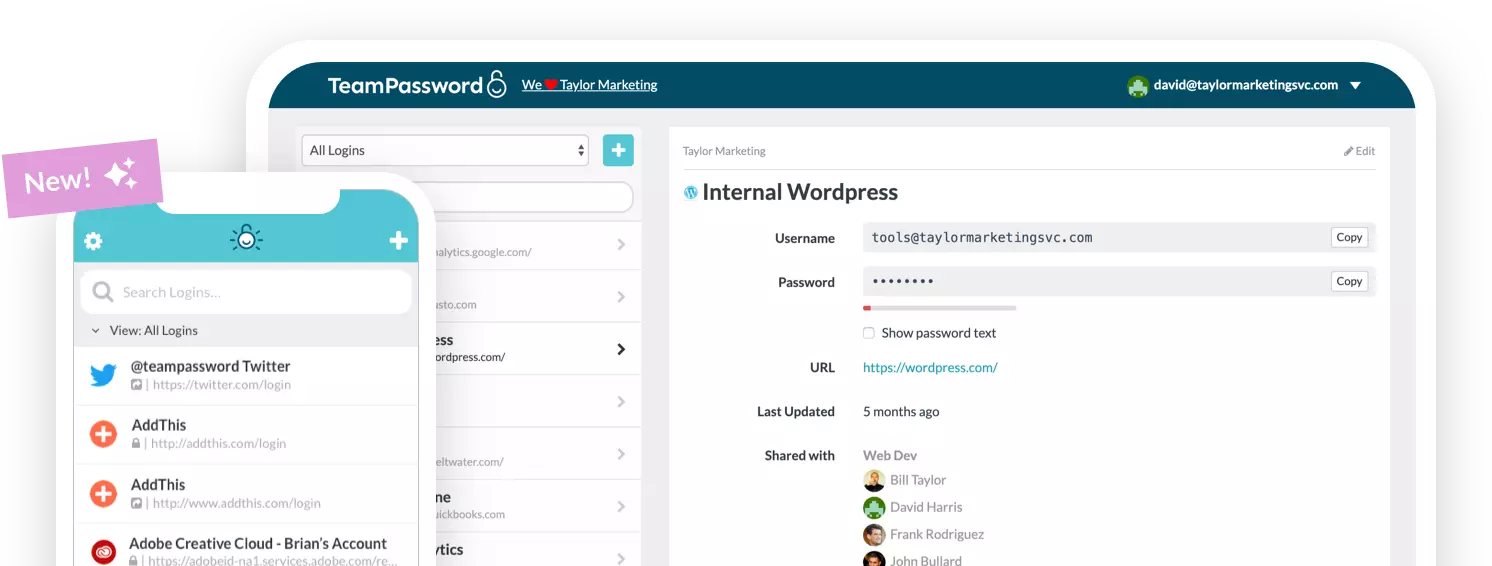
TeamPassword is built for small teams that need simple, fast, shared credential management without a learning curve. That focus makes it a natural fit for a clinical practice where the people logging in are therapists and office staff, not IT specialists.
Pros for therapy practices: an extremely low training burden, which matters enormously when your "users" are busy clinicians; unlimited groups so you can organize access by role, location, or client; one-click granting and revoking that turns contractor turnover from a risk into a routine task; and transparent, small-practice-friendly pricing.
Cons for therapy practices: fewer power-user extras (no bundled VPN or dark-web monitoring), a web-app and browser-extension design rather than a standalone desktop app, and no free-forever tier, though there is a 14-day trial.
Pricing: the Standard plan is $2.41 per user per month billed annually ($2.88 month to month), and the Enterprise plan is $5.25 per user per month billed annually ($6.30 month to month), with a three-user minimum. See the pricing page for the current details.
2. 1Password
1Password is polished, security-forward, and consistently rated for excellent user experience. If you want a premium feel and don't mind paying for it, it's hard to fault.
Pros for therapy practices: smooth onboarding, Watchtower monitoring that flags weak or breached passwords, and guest access that's handy for contractors. Its zero-knowledge model means it can't read your data, which is why 1Password states it isn't a HIPAA business associate and doesn't sign BAAs.
Cons for therapy practices: a higher price point than most of this list, no free team tier, and a feature set that can exceed what a solo practice actually needs. If you're comparing options, here are some 1Password alternatives.
Pricing: the Business plan is $7.99 per user per month billed annually. Very small practices can use the Teams Starter Pack, which covers up to 10 people for a flat $19.95 per month billed annually.
3. Bitwarden
Bitwarden is the open-source, budget-conscious choice, and its code is publicly auditable, which appeals to practices that care about transparency.
Pros for therapy practices: strong free and low-cost tiers, publicly reviewable source code, and a self-hosting option for practices with strict data-governance requirements who want their vault on their own infrastructure.
Cons for therapy practices: setup and especially self-hosting call for a level of technical comfort most clinics don't have in-house, and the interface is less hand-holding than the polished commercial tools, which can slow adoption among non-technical staff. Useful background: Bitwarden vs 1Password and open vs closed source password managers.
Pricing: there's a genuinely usable free tier, the Teams plan is $4 per user per month billed annually, and the Enterprise plan is $6 per user per month. Bitwarden heavily promotes its HIPAA compliance, undergoes annual third-party HIPAA Security Rule audits, and holds SOC 2 Type II and ISO 27001 certifications. Like the rest of this list, though, it relies on zero-knowledge encryption rather than a signed BAA.
4. Dashlane
Dashlane leans into automation and makes onboarding almost effortless, which is exactly what a time-strapped clinic wants.
Pros for therapy practices: superior autofill, a guided setup that walks non-technical users through it, and bundled extras like a VPN and dark-web monitoring on business plans.
Cons for therapy practices: Dashlane has restructured its business lineup around a Password Management plan and a pricier Credential Protection plan, and it no longer publishes a flat per-user price, so you have to go through a buy flow or contact sales to see your number. That opacity, plus a price that historically sat at the higher end, is the main friction for a small clinic. See how it stacks up in Dashlane vs Keeper.
Pricing: quote-based. The base Password Management plan is billed per user per month annually, but you'll need to start a trial or contact Dashlane for the current figure.
5. Keeper
Keeper rounds out the list with a strong compliance story, which is why it earns the fifth slot over more consumer-focused options for a healthcare audience.
Pros for therapy practices: solid compliance positioning and granular admin policies for practices that want tight control over who can do what. Note that, like the others, Keeper's zero-knowledge design means it says a BAA "is not required" and it does not sign one.
Cons for therapy practices: it can feel enterprise-heavy for a small clinic, and add-ons can push the cost up beyond the base price. If name recognition and a free tier matter more to you, LastPass is the obvious alternative, though given that your practice handles sensitive PHI, it's worth being clear-eyed about its documented history of breaches before choosing it. Here's a LastPass alternative roundup if you'd rather steer clear.
Pricing: Keeper offers a Business Starter plan aimed at small teams of roughly 5 to 10 users and a full Business plan, both billed per user per month annually. Keeper doesn't list a flat public rate, so pull a quote through its checkout or sales team.
The HIPAA checklist a password manager quietly handles for you
This is where a password manager earns its keep. Several concrete HIPAA Security Rule obligations map almost directly onto features you get out of the box.
Access control (164.312(a)). The rule wants unique identification for each user. A password manager replaces the one shared clinic password with individual logins per person, so access is tied to a named human rather than a sticky note the whole office uses.
Audit trails. A good manager records who accessed which credential and when. If the HHS Office for Civil Rights (OCR) ever investigates an incident, being able to show a clean access log is the difference between a controlled answer and a shrug. You can't demonstrate accountability you never recorded.
Automatic offboarding. Revoking a departing contractor's access in one click satisfies the requirement to terminate access when someone leaves, and it closes the single biggest risk that comes with high clinical turnover. The per-diem OT who covered last month should not still have a working login this month.
Authentication and MFA. Enforcing 2FA across the tools that hold ePHI is exactly what the Security Rule is moving toward. As noted above, the 2025 NPRM would push MFA from optional-but-recommended to effectively required, so building the habit now is getting ahead of the rule rather than scrambling after it.
Now the honest caveat, because credibility matters more than a sales pitch. A password manager is one control among many. It is not, by itself, a HIPAA compliance program. It won't write your risk assessment, draft your policies, or train your staff on privacy practices. What it does is remove the single most common point of failure in a small practice, credential exposure, which is where a startling share of real breaches actually begin. Treat it as closing your most-used unlocked door, not as a compliance silver bullet. If you want a starting point for the rest, HHS publishes a free Security Risk Assessment Tool built for small providers.
So which one should your practice actually use?
Match the tool to your reality rather than to a feature-count leaderboard.
If you're a solo SLP or single-clinician practice, prioritize dead-simple setup and reliable 2FA. Ease of use beats feature depth every time, because the fanciest tool is worthless if you avoid using it. TeamPassword or Dashlane fit this profile well.
If you run a multi-clinician PT or OT clinic with front-desk and billing staff, prioritize secure sharing, individual per-user accounts, and one-click offboarding. Turnover is your biggest exposure, so the ability to add and remove people cleanly is worth more than any bundled extra.
If your practice has strict self-hosting or data-governance requirements and some in-house technical help, Bitwarden's flexibility and self-hosting option are hard to beat.
If you want premium polish and have the budget, look at 1Password or Keeper. Just don't choose them expecting a signed BAA, because neither offers one; their zero-knowledge design means they say a BAA isn't required.
If your internal policy strictly requires a signed BAA for every vendor, be aware that almost every mainstream password manager will decline, for the zero-knowledge reason above. You'll need to raise that requirement with each vendor directly and decide whether a third-party HIPAA audit (as Bitwarden offers) satisfies the policy instead.
For the majority of speech, occupational, and physical therapy practices, though, the real needs are narrow and consistent: simplicity, fast onboarding of both clinical and admin staff, effortless secure sharing, and clean offboarding when a contractor moves on. That's the exact problem TeamPassword was built to solve. It keeps the training burden low enough that non-technical staff actually adopt it, handles turnover in a single click, organizes access by role or location, and is priced for a small practice rather than an enterprise.
The best time to get your team onto secure, individual logins is before your next new hire walks in, or your next audit does. Start a 14-day free trial and lock the front door first.
This article is for general informational purposes and isn't legal or compliance advice. Confirm current pricing and BAA availability with each vendor, and consult a qualified professional about your practice's specific HIPAA obligations.