
Nonprofits face unique constraints that make software choices more consequential than in most businesses. Budget pressure, shared access, volunteer turnover, and compliance needs mean tools must be affordable, secure, and simple to manage from day one. After all, every dollar spent on overhead is one less that goes to serving your cause.
Here are 14 easy-to-use and low-cost essential software packages that your nonprofit can use today.
TeamPassword is the best password manager available for your nonprofit. Don’t believe us? Sign up for our free trial to unlock 30% off your first year today and try for yourself.
Nonprofit organizations have different software needs
Nonprofits operate under structural constraints that shape every technology decision. Software must support collaboration and accountability without introducing high costs or administrative overhead.
Limited budgets and pressure to justify every dollar
Nonprofits must justify every expense to boards, donors, and grant providers. Software that appears inexpensive in isolation can become difficult to defend when multiplied across staff, volunteers, and programs.
As a result, nonprofits favor tools with free tiers, nonprofit discounts, or flat pricing that scales slowly. Cost predictability often matters more than advanced features.
High turnover and shared access to critical accounts
Many nonprofits rely on volunteers, contractors, or part-time staff who rotate frequently. This creates a constant need to grant and revoke access to shared systems without disrupting operations.
It also necessitates the easy-to-use options. Since volunteers might not have pre-existing skills, and training budgets are limited or non-existent, often the best choice is the most intuitive and not the one with the most features.
Compliance, transparency, and donor trust
Nonprofits are expected to maintain clear records and defensible processes. Donors and regulators want assurance that data, funds, and decisions are handled responsibly.
Software that supports audit trails, clear permissions, and consistent documentation helps nonprofits maintain trust while reducing administrative risk.
A practical nonprofit software stack built around free and low-cost tools
Nonprofits do not need complex or expensive systems to operate effectively. They need reliable tools that solve real operational problems, work well together, and remain affordable as the organization grows.
Here are 14 essential software categories most nonprofits rely on:
- Password manager and secure credential sharing
- Office productivity and collaboration tools
- Constituent relationship management software
- E-signature and document workflow software
- Fundraising and donation management tools
- Event registration and ticketing software
- Point of sale software for in-person donations
- Email marketing and supporter communication
- Project and task management software
- Accounting and bookkeeping software
- Volunteer management platforms
- Social media management software
- Website builders and donation page tools
- File storage and collaboration platforms
Each category includes at least one free or low-cost option that meets core needs without adding unnecessary cost or complexity.
Password manager and secure credential sharing
Nonprofits rely heavily on shared accounts for banking portals, donor platforms, social media, email marketing tools, and vendor services. When passwords are shared informally through email, chat, or documents, access quickly becomes fragmented and insecure, especially as volunteers and staff rotate in and out.
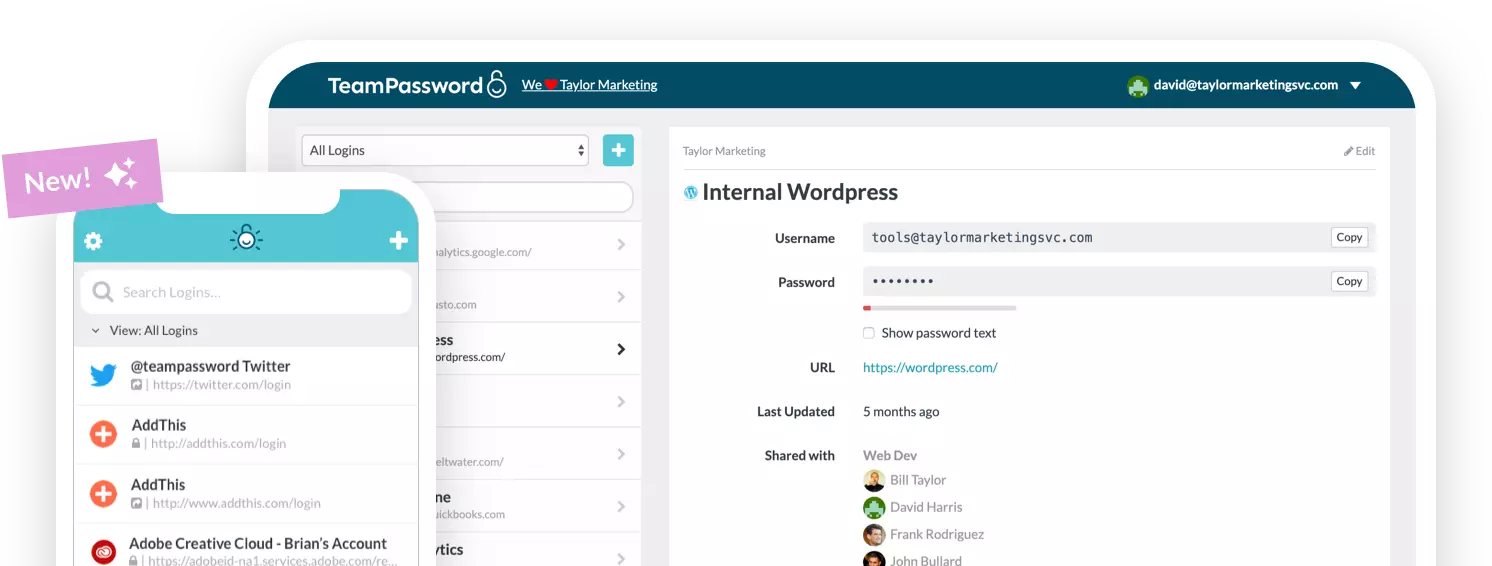
TeamPassword is a low-cost password manager designed specifically for teams that need to share access safely, making it the best password manager for nonprofits. It allows nonprofits to centralize credentials, control permissions, and remove access instantly without changing passwords or disrupting operations.
Here are some key benefits of TeamPassword:
- Secure shared vaults: TeamPassword allows teams to access shared accounts without revealing the actual passwords to individual users. This can save your nonprofit money overall by allowing volunteers to share licenses of other pricy software.
- Role-based permissions: Access can be limited by role, department, or project so users only see what they need, keeping your donors’ data secure.
- Clear audit visibility: Activity logs show who accessed credentials and when, supporting accountability and internal controls and helping you eliminate underutilized software from your budget.
- Fast onboarding and offboarding: New volunteers and staff gain access quickly, and departing users can be removed instantly.
- Low, predictable pricing: Flat, affordable pricing makes TeamPassword accessible for nonprofits without enterprise budgets.
Office productivity and collaboration tools
Nonprofits create and manage a constant flow of documents, spreadsheets, and presentations. Grant applications, budgets, board materials, and internal policies all require tools that support collaboration without complex setup or licensing overhead.
Google Workspace, including Docs, Sheets, and Slides, is the strongest free option for most nonprofits. They support real-time collaboration, autosave, version history, and easy sharing. The tools are widely understood, reduce training needs, and integrate cleanly with email and file storage.
Constituent relationship management software
Tracking donors, volunteers, partners, and beneficiaries is essential for continuity and accountability. Without a CRM, information becomes scattered across spreadsheets, inboxes, and individual memory, which increases risk as staff and volunteers change.
HubSpot CRM offers a robust free tier that covers contact management, notes, and basic reporting as well as special pricing for nonprofits. For nonprofits that need more customization, Zoho CRM provides a low-cost alternative with nonprofit-friendly pricing and scalable features.
E-signature and document workflow software
Nonprofits regularly need signed agreements for volunteers, vendors, partners, and internal governance. Manual signing slows processes, increases errors, and creates storage challenges that complicate audits and reporting.
SignTime provides legally valid electronic signatures at a cost that fits nonprofit budgets. It simplifies document workflows, maintains audit trails, and eliminates printing and scanning while supporting compliance requirements across common nonprofit use cases.
Fundraising and donation management tools
Digital fundraising supports sustainability by making it easy for supporters to give when motivation is high. Donation tracking and receipts are also critical for transparency and donor trust.
Givebutter offers a free platform with donation pages, campaigns, and donor tracking supported by transaction fees. Donorbox is another low-cost option that integrates easily with existing websites and supports recurring donations.
Event registration and ticketing software
Events remain a core channel for fundraising, outreach, and community engagement. Manual registration processes create friction for attendees and staff alike.
Eventbrite provides a free option for no-cost events and simple paid ticketing as well as a special nonprofits paid tier. Givebutter also supports event registrations tied directly to fundraising campaigns, which works well for nonprofit-hosted gatherings and benefit events.
Point of sale software for in-person donations
Many nonprofits collect donations at events, pop-ups, and community spaces. Cash-only systems limit contributions and increase reconciliation work.
Square offers free point of sale software with affordable hardware and simple reporting. It supports card and contactless payments, issues digital receipts, and integrates smoothly with fundraising workflows.
Email marketing and supporter communication
Email remains one of the most effective channels for donor engagement and volunteer coordination. Consistent communication helps maintain relationships and encourage repeat involvement.
Mailchimp provides a free tier suitable for small lists and basic campaigns as well as a 15% discount on paid tiers for nonprofits. Brevo offers another low-cost option with strong transactional email support, making both platforms accessible for growing nonprofits.
Project and task management software
Nonprofits often manage multiple programs with limited staff and geographically distributed contributors. Without clear task ownership, important work can stall or be duplicated.
Notion offers a free, visual system for organizing tasks and projects. Its boards and cards are easy to understand, require little training, and work well for teams with mixed technical experience. Notion also offers a 50% discount on paid tiers for nonprofits.
Accounting and bookkeeping software
Financial transparency is central to nonprofit credibility. Accurate records support audits, grant reporting, and informed decision-making.
Wave Accounting provides free tools for income and expense tracking, invoicing, and reporting. It is well suited for small nonprofits that need clear financial visibility without the cost of full accounting suites.
Volunteer management platforms
Volunteers are essential to many nonprofits, but coordinating schedules and responsibilities can be complex. Manual systems increase no-shows and burnout.
SignUpGenius offers a free option for managing volunteer sign-ups and schedules. It reduces administrative effort while giving volunteers clarity about expectations and commitments.
Social media management software
Social platforms help nonprofits build awareness and engage supporters. Managing posts manually across channels consumes time and increases inconsistency.
Buffer provides a free plan that allows scheduling posts and reviewing basic performance metrics. It simplifies content planning and helps maintain a steady online presence. It also offers a 50% discount for non-profits
Website builders and donation page tools
A nonprofit website serves as a public trust signal and a primary entry point for donors and volunteers. Poor usability can undermine credibility.
WordPress.com offers a free starting point with customizable themes and basic SEO tools. It supports content publishing and integrates with donation platforms as needs evolve.
File storage and collaboration platforms
Nonprofits need secure, centralized access to documents across staff and volunteers. Local storage creates silos and increases the risk of data loss.
Google Drive provides free cloud storage with permission controls and version history. It supports collaboration across devices and integrates naturally with Google productivity tools.
TeamPassword is an essential part of every nonprofit software stack
Every tool in a nonprofit software stack depends on secure access. Email platforms, fundraising systems, financial tools, and social media accounts all rely on shared credentials that must remain protected as people join and leave the organization.
TeamPassword provides the foundation that makes this stack safe and manageable. By enabling secure sharing, clear permissions, and fast access changes at a low cost, TeamPassword helps nonprofits protect their systems, prevent cyberattacks, save money on other costly software, and operate with confidence as they grow.
TeamPassword is the best password manager for nonprofits. Don’t believe us? Sign up for a 14-day free trial today and try for yourself.