
For 39 days starting June 11, 2026, the largest sporting event ever staged will run across 16 host cities in the United States, Canada, and Mexico. An expanded 48-team tournament, 104 matches, and a broadcast audience approaching half the planet. Most cybersecurity advice you have read about it so far has been aimed at the individual fan: stop using your favorite player's name as a password, watch out for fake ticket sites, do not trust the Wi-Fi at the stadium bar.
That advice is sound. But it misses the bigger risk for anyone running a business. During a month-long tournament played in convenient North American time zones, your employees will not just be fans at home. They will be sharing streaming logins in your team chat, reusing passwords across work and personal accounts, and checking the score on hotel and stadium networks while logged into your systems. The World Cup is not only a password problem for fans. It is a shared-credential problem for teams.
Keep a Clean Sheet on Security: 50% Off TeamPassword Through July 31
The numbers that should worry every team lead
Recent research paints a clear picture of how fragile fan credentials are. A survey of 6,000 football fans across six countries found that roughly one in four had used football-related information in a password, and that 71.7% of US fans reuse the same password or a close variation on at least one other account. Separate analysis of breached data has surfaced more than 1.1 million passwords containing football terms, with the word "Football" alone appearing over 350,000 times. A study of 6.4 billion breached passwords even ranked players by how often their names show up in stolen credential dumps.
The most alarming figure for businesses is this one: among US fans who shared a password so someone else could watch sports, 65% said that same password was also used on another account such as email, shopping, or banking. A login casually pasted into a group chat so a friend can stream a match is very often the same login protecting something that actually matters. Reuse at that scale turns one exposed password into a master key, which is exactly the mechanism behind credential stuffing.
How the tournament becomes a workplace attack surface
Major-event threat intelligence consistently shows a spike in fraud and social engineering timed to the tournament window. During the 2022 World Cup, researchers documented more than 16,000 fraudulent domains and dozens of compromised fan-portal accounts. For 2026, it is reasonable to expect the same playbook at greater scale: lookalike ticket sites, fake mobile apps, and phishing lures themed around ticket cancellations, accreditation problems, prize giveaways, and free streaming.
Here is how that reaches your business. An employee clicks a convincing "your match tickets need verification" email and hands over a password. Because that password is reused, the attacker now has a foothold in a work account too. From there, the path to a serious breach is short, especially when teams rely on a shared login that lives in a spreadsheet or a pinned message. Spear phishing and impersonation are the favored entry points, which is why enterprise security teams treat the IT help desk as a first line of defense during high-risk windows.
The common thread across every one of these scenarios is credentials that are shared insecurely, reused widely, and never rotated. Those are the three weaknesses a tournament amplifies, and they are exactly the weaknesses a team password manager is built to close.
Five plays to keep a clean sheet this summer
1. Get shared passwords out of chat and spreadsheets. The single most dangerous habit is storing logins where everyone can see them and no one can revoke them. If your team still keeps credentials in a doc, a chat thread, or a shared note, you are sitting on one of the most dangerous ways to store passwords. A dedicated password manager for teams lets people use a shared login without ever seeing the raw password.
2. Make every password unique and strong. Reuse is what turns a single phished credential into a company-wide problem. Generate long, random passwords for every account with a password generator, or teach your team to build a memorable passphrase for the handful of logins they type by hand. No player names, no shirt numbers, no tournament years.
3. Turn on multi-factor authentication everywhere it counts. Even a guessed or stolen password should not be enough on its own. Understand the difference between 2FA and MFA, then roll it out across email, finance, and admin accounts. Where you can, move toward phishing-resistant options like passkeys.
4. Give people only the access they need. Not everyone needs the keys to everything. Applying the principle of least privilege means that if one account is compromised, the blast radius stays small. Organizing credentials into role-based groups keeps shared access tidy and auditable.
5. Rotate and monitor shared credentials during the tournament. Treat the World Cup window as a heightened-risk period. Rotate critical shared logins before kickoff, keep an eye on your access logs for unusual activity, and remind everyone how to spot a tournament-themed scam. A quick refresher on talking to your team about cybersecurity goes a long way when everyone is distracted by the group stage.
Game On: 50% Off Your First Year
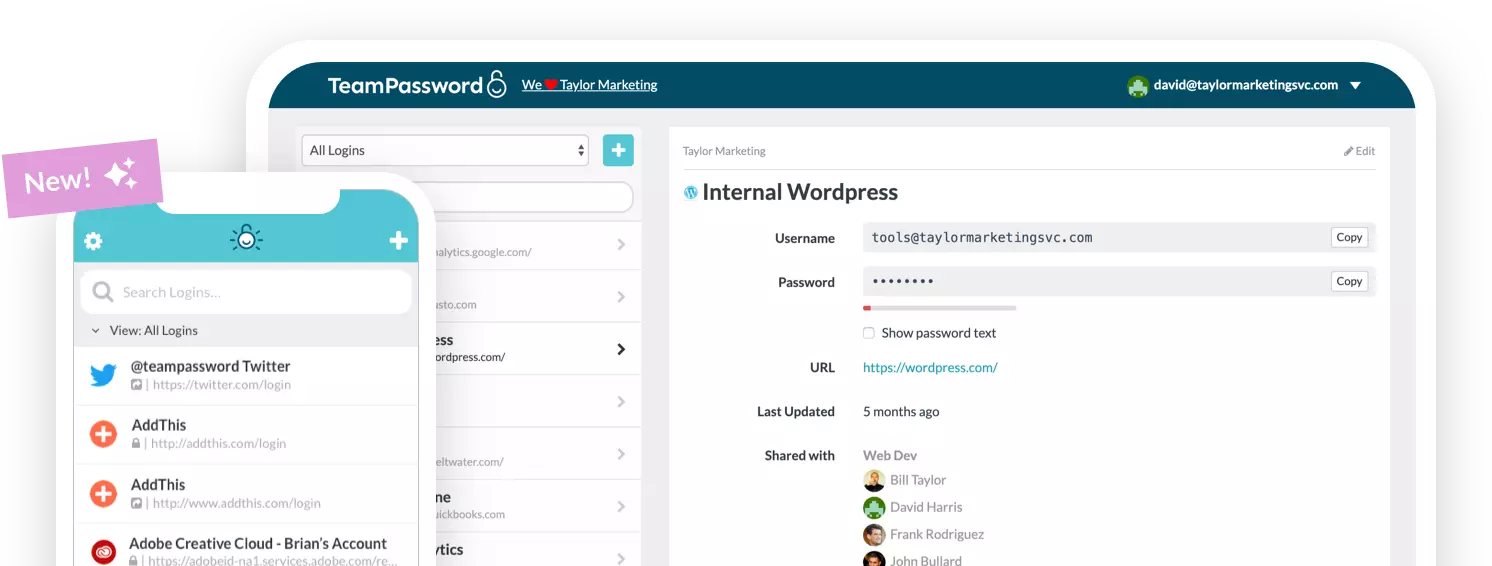
You would not leave your goal undefended for 39 days, so do not leave your team's credentials exposed either. TeamPassword makes it simple to share logins securely, generate strong passwords, and control who can access what, with no spreadsheets and no passwords pasted into chat.
- One-Time Share — Hand a streaming or vendor login to a teammate or contractor for a limited window, without giving them permanent access or revealing the raw password.
- Enforceable 2FA — Mandate two-factor authentication across every user, so a phished password during the tournament is not enough on its own.
- Multiple User Roles — Granular permissions so access is granted only where it is needed, keeping the blast radius small.
- Detailed Activity Logs — A full audit trail of who accessed what and when, ideal for spotting unusual access during a high-risk window.
Plans start at just $2.41 per user per month. Keep a clean sheet on security: get 50% off your first year through 31 July. Final whistle is 31 July, so game on. Start your free trial today →
Frequently Asked Questions
Why is the World Cup a cybersecurity risk for businesses and not just fans?
During the tournament, employees share streaming logins, reuse passwords across work and personal accounts, and connect to public networks while logged into company systems. Because the vast majority of fans reuse passwords, a credential exposed through a fan-related scam can become a foothold in a work account, turning a personal habit into a business breach.
Are football-themed passwords really that easy to crack?
Yes. Research on breached data has found more than 1.1 million passwords containing football terms, and predictable choices like a club name plus a year or shirt number are among the first combinations attackers try. Any password built from publicly known interests is far weaker than a long, random one.
What is the safest way for a team to share a streaming or work login?
The safest method is a dedicated team password manager that lets people use a shared login without ever seeing the underlying password, with encrypted storage and the ability to revoke access instantly. Sharing through chat messages, emails, or spreadsheets leaves credentials exposed and impossible to control.
Does multi-factor authentication stop World Cup phishing attacks?
Multi-factor authentication greatly reduces the damage from a stolen or guessed password, because the attacker still needs a second factor. It is not foolproof against every technique, so it works best alongside unique passwords, least-privilege access, and phishing-resistant methods like passkeys.
What should my team do before the tournament starts?
Move shared credentials out of chats and spreadsheets into a password manager, replace reused passwords with unique ones, enable MFA on critical accounts, apply least-privilege access, and rotate important shared logins. A short reminder about tournament-themed scams helps keep everyone alert.