
Almost every team eventually needs more than one person to use a single card. The marketing manager has to top up ad spend, an assistant books travel, someone in ops renews a stack of SaaS subscriptions. The fastest thing to do is paste the number into an email or a Slack message, and that is exactly the habit that gets companies defrauded.
For a long time the standard advice was simply "don't." There was no clean way to hand a card to a teammate without exposing it, so guides steered you toward reimbursement or a separate corporate card. That advice is now out of date. With a purpose-built, encrypted Credit Card record, there is a safe way to share a card with your team; this guide walks through exactly how to do it, plus the guardrails that keep it safe.
Why sharing raw card numbers is risky
The problem isn't sharing the card, it's how most teams do it. Sending the digits over email or chat creates several distinct risks at once.
It can be intercepted. Email and chat messages pass through servers, devices, and backups you don't control, and a single compromised inbox or a well-aimed spear-phishing message can expose the number to an attacker. Card details sent over an unsecured connection are also a classic target for a man-in-the-middle attack.
There's no audit trail. Once a number lands in a group chat or a shared note, you have no reliable way to know who copied it, forwarded it, or saved it somewhere else. Pasting it into a spreadsheet or a sticky note is one of the most dangerous ways to store sensitive credentials.
You can't revoke it. When someone leaves the team, the number is already in their inbox history. Your only real remedy is to call the issuer and replace the card, disrupting every legitimate charge tied to it.
And there's fraud-liability and terms-of-service exposure. Loosely circulated card details are easier to abuse, and many cardholder agreements restrict use to the named cardholder, which can complicate a dispute if something goes wrong.
The secure way: store it in an encrypted Credit Card record
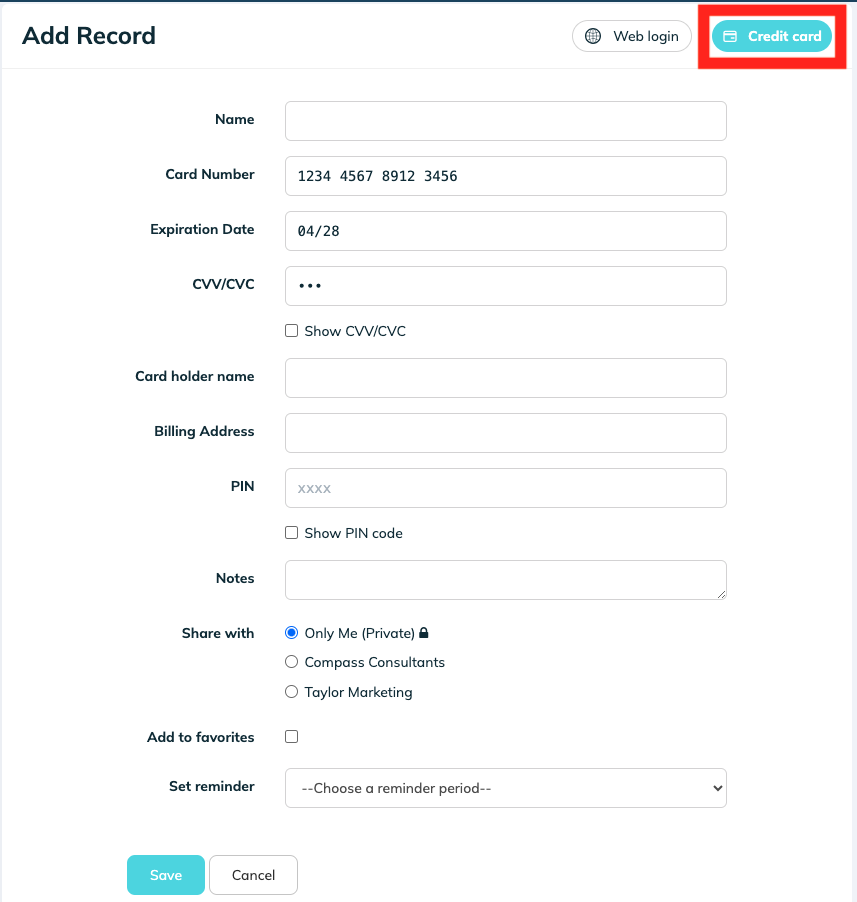
TeamPassword includes a dedicated Credit Card record type built for exactly this job. Instead of forcing card data into a generic login (cardholder name in the username field, the number as a "password," the rest crammed into notes), it gives each piece of the card its own structured field: Card Number, Expiration, CVV/CVC, Cardholder, Billing Address, and PIN. Sensitive fields like the CVV and PIN are masked by default.
The data is protected the same way every other record is: it's hashed, salted, and encrypted locally before it ever reaches TeamPassword's servers, so the details are never stored or transmitted in plain text. You can read more on the TeamPassword security page. Crucially, you decide who can open the record — and you can change that at any time without touching the card itself.
How to share a credit card in TeamPassword
Adding a card and sharing it takes about a minute. Here are the four steps:
- Click the blue + on your dashboard to add a new record.
- In the top right, select Credit Card and fill in your information.
- Choose to save the card as private, or select the groups you want to share it with.
- Click Save.
Prefer to watch it done? Here's a short walkthrough:
Sharing safely: the guardrails
The vault solves the encryption and revocation problem. A few habits make the rest of the workflow tight.
Share with groups, not individuals. Assigning the card to a group rather than to specific people means access follows roles. When someone joins or leaves a function, you update the group once instead of hunting down individual shares. This is the principle of least privilege in practice — only the people who actually need the card can see it. If you manage access by role across the business, a role-based access control approach scales this further.
Keep the CVV hidden. Leave sensitive fields masked so the card can be used at checkout without the most sensitive digits sitting exposed on a screen during a call or a screen-share.
Monitor access with the activity log. TeamPassword's activity log records who accessed and changed records, which gives you the audit trail that email and chat never will — useful for both security and compliance.
Rotate and remove access at offboarding. The day someone leaves, drop them from the group; access ends instantly with no need to reissue the card. For a complete offboarding, fold a card or credential rotation into your standard checklist. If you ever do need to hand a one-off detail to someone outside a shared group, use a self-destructing one-time secret rather than a chat message.
When a vault isn't the right tool
A shared, encrypted record is the right answer when several people need access to one existing card — a company card covering subscriptions, ad accounts, or travel. It isn't the only option, and for some situations another tool fits better.
For high-volume or per-person spend, virtual or issued cards (for example Stripe Issuing, Ramp, or Brex) let you give each employee or vendor their own number with its own limits, which can be cleaner to reconcile and cap. For occasional one-off purchases, plain reimbursement may be simpler than granting card access at all. And if your card supports it, adding named authorized users keeps everyone within the cardholder agreement.
The comparison below sums up where each method lands:
| Method | Security | Audit trail | Revocable | Best for |
|---|---|---|---|---|
| Shared card via TeamPassword | High — encrypted, masked fields | Yes — activity log | Yes — remove from group instantly | Several people using one existing card |
| Virtual / issued cards | High — per-card limits | Yes — issuer dashboard | Yes — kill individual cards | High-volume or per-person spend |
| Reimbursement | High — no card shared | Via expense reports | N/A | Occasional one-off purchases |
| Authorized users | Medium — physical cards in circulation | Limited | Slow — call the issuer | A small number of trusted, named staff |
Frequently asked questions
Is it safe to share a credit card through a password manager?
Yes! Far safer than email, chat, or a shared spreadsheet. A reputable password manager encrypts the card details, controls exactly who can open the record, and keeps a log of access. With TeamPassword, card data is hashed, salted, and encrypted locally before it ever reaches the server, so no one, including TeamPassword, can read it in plain text.
How do I stop an employee from accessing the card after they leave?
Remove them from the group the card is shared with, or deactivate their account. Access ends immediately and you don't have to reissue the card. For a true offboarding, rotate the card or its security details as part of your standard process.
Can I hide the CVV from people I share with?
Sensitive fields like the CVV/CVC and PIN are masked by default in the Credit Card record, so teammates can use the card for checkout without the most sensitive digits sitting in plain view.
Is sharing a card with employees against my card's terms?
Many cardholder agreements restrict use to the named cardholder, and consumer cards in particular often prohibit sharing. Check your agreement before sharing a card with staff. The cleanest route is usually a business card that lets you add authorized users, or a virtual/issued card per person.
Share your team's cards the safe way
There's no longer a trade-off between convenience and security. Store the card once in an encrypted Credit Card record, share it with the right group, and manage access from one place — no more numbers floating around inboxes. TeamPassword is built for exactly this kind of team-based sharing, with plans starting at $2.41/user/month billed annually.
Start your 14-day free trial and share your team's cards securely today.