The Ultimate Employee Offboarding Guide for Data Security

Do you have an offboarding process ready to go?
Properly handing off company information when an employee leaves can be a significant challenge. What if the employee leaving has accounts created with their email address? What if they had access to sensitive data? What if they control the Starbucks rewards card?
While it might be easy to laugh about the company coffee budget, the reality of employee offboarding in today's remote and hybrid work environment is no joke. The complexity of modern tech stacks means that a departing employee's digital footprint is vastly larger than it was even a few years ago. Joking aside, recent 2024 and 2025 cybersecurity reports on SaaS sprawl indicate a growing crisis: over 65% of ex-employees admit to retaining access to at least one company system after their departure. Even more terrifying, a significant percentage of businesses have experienced data breaches, intellectual property theft, or compliance violations directly caused by former employees who slipped through the cracks of a messy offboarding process.
Don’t stress! Your team can handle a smooth transition with the right plan. A structured, standardized approach will protect your assets and your reputation. Here’s how to lock down your data when an employee moves on!
Table of Contents
1. Develop Data Protection Policies
Protecting company data shouldn’t be a step you take after an employee submits their resignation letter. The first step in securing your data is to create a policy. Data protection policies should be in place for new hires and existing employees throughout their tenure.
Establish specific policies and procedures for employees who handle company data and clear penalties for those who do not abide by them. If you have a legal department, they should guide what the policy contains. If you don’t, there are examples online that you can use, but be sure to read through them and make sure that the policy fits your business. Having set policies is more transparent and will protect your organization from the risks of data theft or loss when employees move on.
When developing data protection policies, it’s essential to align them with broader government regulations such as GDPR, HIPAA, or CCPA, depending on your industry and location. These regulations often outline strict requirements for handling personal data and ensuring privacy, which can inform your internal procedures. For example, policies covering data access, storage, and disposal should reflect legal standards to avoid fines or legal repercussions. Clear documentation and employee training ensure that your company stays compliant with both internal policies and external laws, reducing the risk of breaches and enhancing security. Regulatory bodies do not accept "we forgot to revoke their access" as a valid excuse during a compliance audit.
Have employees sign technology policies and keep them informed
Once you have a policy, it’s essential that all employees know the policy and, more importantly, abide by it. It may be worthwhile to create a "data security" training program for all employees at your company. Don’t have the time or the resources to develop a program? Some companies will do it for you. Building a culture of security from day one sets the tone that data protection is taken seriously.
Technology policies shouldn’t just be posted on the bulletin board or hidden in a massive employee handbook; they should be read and signed. The act of signing gives the policy more importance and encourages employees to read through them more closely. Consider requiring annual re-signatures to keep security top-of-mind.
2. Limit Employee Access to Company Data
While employees need data and logins to accomplish their work, too much access poses significant data security risks. Not every employee needs unrestricted access to all of your business or client information. Instead, employees should only have access to the information necessary to do their jobs. This is a fundamental security concept called the Principle of Least Privilege (PoLP).
A common way to implement access levels is with a password manager. With a password manager, you can make groups such as marketing, accounting, and sales, and you can easily share and revoke access as needed. By isolating access to specific departments, you minimize the blast radius if an account is compromised.
Use a password manager to track activity and change logins
When an employee leaves, it will be essential to look out for significant download increases, strange access requests, and unusual file transfer loads. This is a common way to cause damage, and it can happen without you ever finding out if you aren’t tracking it.
So how can you be sure that no one is using logins after they’ve left or using data in strange amounts or weird times? You track it. One of the easiest ways is with a password manager. When you store all of your passwords with a password manager, an employee has to go through the password manager to log in, and when they do, it will show up on the activity log. This audit trail is critical for post-employment security verification.
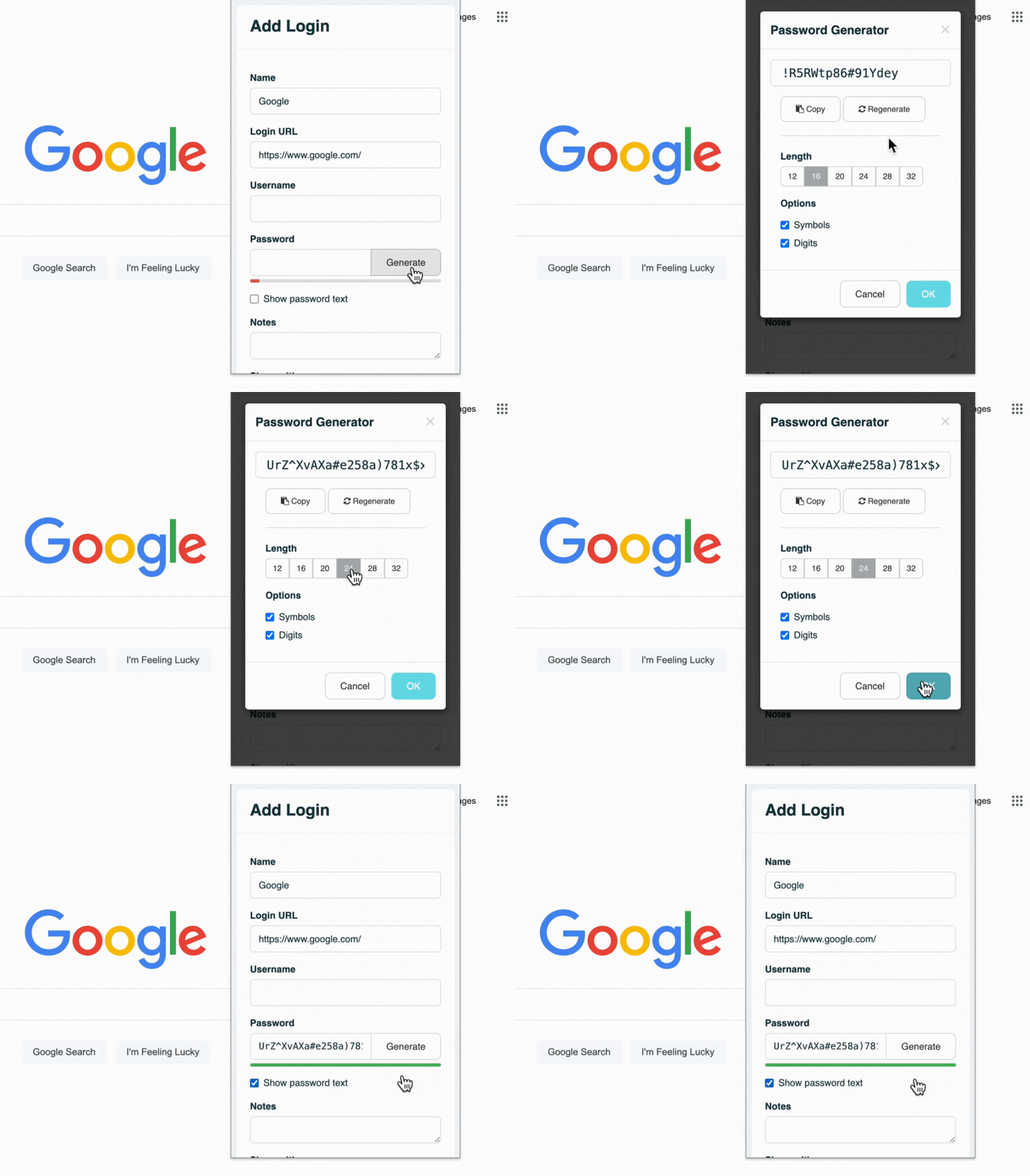
To prevent data breaches from ex-employees, it is best practice to change company passwords immediately upon their departure. A password manager makes it easy to update passwords with new solid unique passwords for each account they had access to.
Control user access in a central authenticated system
It is essential to ensure employees are removed from everything, not just the big stuff. Damage can still be done with social media accounts or with other services like customer service platforms. Regaining control of accounts created by employees that have already left can be difficult. In worse cases, an employee can hold company accounts hostage. There have even been extreme cases where employees that still had access to the company's social media used them to tarnish the company's reputation.
Today, this threat is compounded by the explosion of decentralized software and cloud tools, a massive vulnerability known as Shadow IT. The biggest offboarding nightmare isn't just standard software; it's the proliferation of AI tools. You must ensure you are removing access to premium AI subscriptions (like ChatGPT Enterprise or GitHub Copilot), or custom AI agents trained on proprietary company data. If an ex-employee retains access to an AI tool fed with your source code or client lists, your intellectual property is highly vulnerable.
A Single Sign-On (SSO) system is one of the easiest ways to control access. When logins are controlled through one central account like Google Workspace (formerly G Suite) or Microsoft Entra ID, it is far easier to give and revoke access with the click of a few buttons. No more trying to think of every login the employee had access to. Instead, you can remove them from everything all at once through the central directory.
Set up accounts in a central location like Google SSO or Active Directory, and ensure all cloud applications are SAML authenticated. This makes it significantly easier to manage and de-provision employee accounts comprehensively.
3. Create and Use a Categorized Offboarding Checklist
To ensure data protection during an employee exit, you'll need a standardized list to cover your bases. These include simple things that may be obvious, but you don’t want to push them off until the last possible second. By categorizing your offboarding checklist, you ensure that Human Resources, IT, and Management all know their specific responsibilities. Making sure every possible security breach is on this list ensures all loose ends are tied up.
HR & Administrative Tasks
- Prepare necessary paperwork: Ensure final paychecks, benefits documentation, and COBRA forms are ready.
- Review Non-Disclosure Agreements (NDAs): Reiterate the importance of data confidentiality and review the company's data security policies signed at hiring with the departing employee.
- Schedule an exit interview: Coordinate a final meeting between the employee and HR or management.
IT & Security Tasks (Disable All Access)
Plug the holes immediately. Recent cybersecurity threat assessments highlight that disgruntled ex-employees deliberately using retained credentials to disrupt business operations or steal client lists is an escalating threat vector. Here are the steps IT must take to ensure every access point is closed:
- Disable Directory Access: If your logins are stored in a centralized location like Google Workspace SSO or Active Directory, immediately disable access. After a standard retention period (like 30 days), delete the account entirely to free up licenses and close the vulnerability.
- Update Shared Credentials: Change passwords, especially on shared accounts within your password manager, to ensure they can’t access them with remembered or physically written-down passwords.
- Redirect Communications: Reroute the departing employee's email inbox and phone extension to an appropriate active individual so no client communications are lost.
- Revoke Network Privileges: Disable all access to the company VPN and internal network architecture.
- Audit for Shadow IT & AI Apps: Specifically check for unauthorized SaaS applications, premium AI accounts, or software they may have signed up for using their corporate email.
Hardware & Asset Recovery
Physical assets are just as critical as digital ones. An employee walking out the door with a local hard drive full of data is a major breach.
- Conduct a Thorough Inventory: Identify all projects, local files, and physical devices that the employee had access to. Ensure that all company materials, documents, and external drives are returned.
- Recover Company Assets: Collect physical items such as company credit cards, security badges, fob access devices, or physical office keys.
- Secure and Wipe Company Devices: Collect the employee's company-issued phones, tablets, or laptops and securely wipe them of any sensitive data before reissuing them.
- Enforce BYOD Policies: If anyone is allowed to work on personal devices (Bring Your Own Device), establish a strict data recovery policy. If a remote corporate wipe isn’t possible, there should be a legally binding policy that requires the departing employee to provide their personal device for IT to clean out corporate data.
- Close Financial Accounts: Close out any corporate credit cards or expense accounts in that employee’s name and process any outstanding fees or reimbursements.
4. Conduct a Meaningful Exit Interview
One of the most important things you can do when an employee leaves your company is to understand why they’ve chosen to go. Exit interviews can be an invaluable tool to gain insight into your organization. The advantage of having these conversations is that departing employees are far more likely to give honest, unfiltered feedback. This feedback will help you identify areas that can help improve staff retention, fix toxic work environments, and highlight ways to improve as management.
Beyond gathering operational feedback, a final conversation allows the employee to leave on a good note whether they are choosing to leave themselves or being let go by the company. Striving for an amicable, respectful parting heavily reduces the psychological risk of disgruntled employees becoming malicious insider threats. An employee who feels heard and respected on their way out is significantly less likely to attempt data sabotage or reputational damage.
During this meeting, verbally confirm that all tasks on the offboarding checklist are complete. Even unintentional data breaches can have severe consequences. Departing employees may inadvertently take confidential information with them, leading to potential legal issues and reputational damage. While these general guidelines provide a solid foundation, your specific industry and company may require additional measures. For instance, if you handle highly sensitive financial or medical data, you might need to implement more stringent compliance protocols during this final sign-off.
Protect Company Passwords with TeamPassword
A secure, airtight offboarding process is ultimately a team effort. Bridging the gap between Human Resources handling the human element and IT handling the technical element ensures nothing slips through the cracks.
If you are tired of stressing over who knows your company passwords when an employee resigns, TeamPassword is your solution. Our intuitive platform streamlines password management, ensuring your company's sensitive data remains protected during every employee transition.
Key Benefits:
- Effortless Access Revocation: Easily and instantly revoke access to company passwords for departing employees, preventing unauthorized post-employment access.
- Strong Password Generation: Our built-in password generator creates complex, unique passwords to replace old credentials, enhancing your overall security posture.
- Seamless Password Management: Our lightweight browser extension allows you to update and save passwords directly from your browser, saving your IT team valuable time and effort.
- Enhanced Visibility: Our activity log provides a clear, immutable audit trail, showing exactly who has access to which passwords and when they were last used.
- Unparalleled Security: TeamPassword employs industry-leading AES 256-bit encryption to safeguard your passwords and supports multi-factor authentication (MFA) for added protection, which can be strictly enforced for your entire organization.
Don't take our word for it! Ensure your offboarding is secure by taking control of your credentials today. Try TeamPassword FREE for 14 days. Simplify your password management, strengthen your security, and empower your team.
おすすめの記事
9 Tools for Marketing Agencies in 2026
Here are nine best marketing tools to manage your business, contract workers, freelancers and more. Also, start using ...
5 Cybersecurity Mistakes Every Boss Should Be Aware Of In 2026
If you manage employees, it’s crucial that you understand the risks they face and how you can protect ...
The 5 Best Enterprise Password Vaults (2026 Comparison)
Standard password tools fail at enterprise scale. Learn how to choose a password manager for security, compliance (SOC ...