


Trust, but Verify: Why Your Team Needs an Activity Log

Managing a team requires a delicate balance of trust and control. You hand over the "keys" to your digital kingdom—logins for social media, bank accounts, and critical SaaS tools—because your team needs them to do their jobs.
But there is a specific anxiety that comes with sharing access. It’s the "Blind Spot." You know that someone unlocked the door, but do you know who it was, when they did it, or what they did once inside?
If you ran a physical office building, you wouldn't just hand out master keys without a system to track who enters the building after hours. Your digital infrastructure deserves the same level of security.
Table of Contents
Introducing the Activity Log
The goal of an Activity Log isn’t to police your employees or create a culture of distrust. It is about shifting the narrative from "surveillance" to "protection."
Think of the TeamPassword Activity Log as the "black box" flight recorder for your organization. It operates quietly in the background, capturing essential data points. When everything is running smoothly, you barely know it’s there. But when something goes wrong, or an auditor comes knocking, it becomes the most valuable tool in your arsenal.
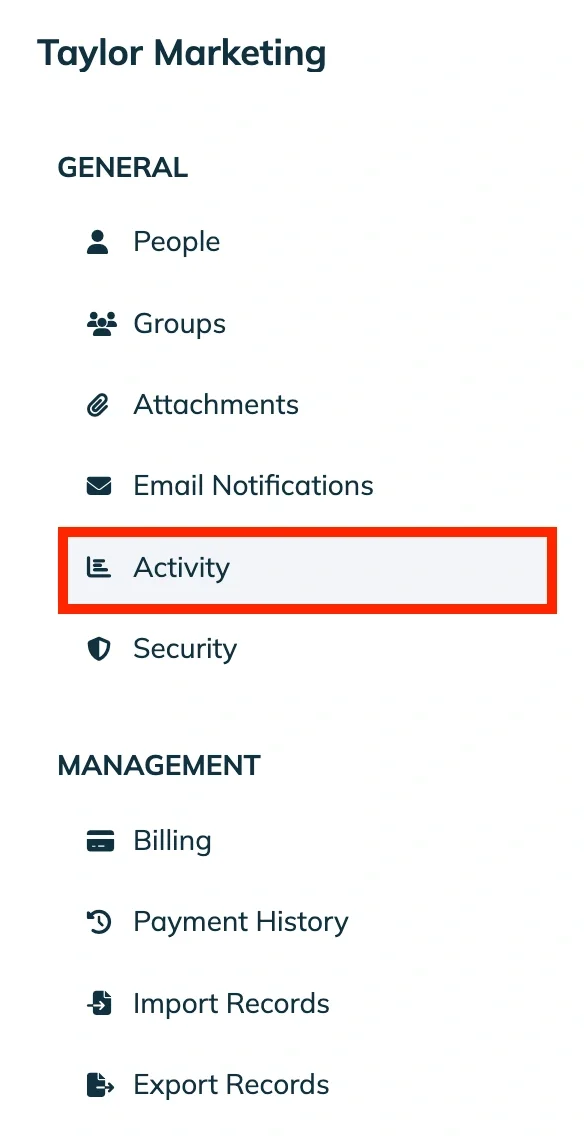
How to find the activity log in TeamPassword
- Click your email address in the top right of your home dashboard
- Click the name of your organization under Manage Teams
- On the left side, select Activity
How the Activity Log Empowers Team Leads
For Managers, Admins, and Owners, the Activity Log solves two major headaches: Internal Forensics and External Compliance.
1. Forensics: Untangling Mistakes
We’ve all been there. You go to log into the main Marketing account, and the credentials are gone. Or changed.
Without an Activity Log, this triggers a panic. You send a frantic Slack message: "Who deleted the Twitter login?" No one remembers doing it. The atmosphere gets tense.
With the Activity Log, you skip the "blame game." You simply filter the log, see that Taylor accidentally deleted the record while trying to update it at 2:00 PM, and you restore it. You can approach Taylor directly to offer training on how to update records correctly.
- Problem: "Who broke this?"
- Activity Log Solution: "I see what happened; let’s fix it."

2. Audit Trails: The Compliance Savior
If your industry requires SOC2, ISO, or HIPAA compliance, you know that "trust" isn't a valid security policy. Auditors need proof.
Consider this scenario:
A manager, Sarah, is preparing for a surprise security audit. In the past, she would have spent hours manually cross-referencing emails and Slack messages to prove who had access to specific financial tools. With the Activity Log, Sarah simply filters for relevant logins, hits "Export to CSV," and hands the auditor a timestamped, immutable record of every access event, creation, and deletion over the last 90 days.
The ability to export data turns a week of stress into a five-minute task.

Activity log filtered to only show activity related to Bank records
A Feature Built for Leadership
We designed the Activity Log specifically for the "Lead" perspective.
- Exclusive Visibility: This feature is viewable only by Admins and Owners.
- Clutter-Free: We don’t burden standard users with this data. They get a clean interface to do their work, while you maintain the high-level oversight required to protect the business.
Visibility Equals Security
A transparent organization is a secure organization. The Activity Log gives you the peace of mind that comes with knowing exactly what is happening within your team—not so you can hover over them, but so you can protect them.
Don't wait for a deleted folder or a security audit to realize you need better visibility. Review your Activity Log today and turn your "Blind Spot" into your greatest asset.
Ready to eliminate the guesswork? TeamPassword is built to give you total control over who has access to what, when, and where. Start your 14-day free trial today to unlock full visibility and secure your business in minutes.







